
ACADEMY · TUTORING
Run your academy from one screen.
Attendance, homework, retests and parent updates in one place, instead of five spreadsheets and a group chat. I built one for a real academy and it's in daily use.

WHO IT'S FOR
Ideal if…
- Students slip through when homework checks and retests are tracked by hand
- Parent messages eat your evenings
- Attendance lives in Excel, scores on paper, notices in a group chat
- Off-the-shelf LMS tools cost too much or don't fit how you teach
REAL SCREENS
See it, don't just read it
BEFORE → AFTER
What changes
Homework checks on paper, retests on sticky notes, and a parent asks “how is my kid doing?” while you dig through three files.
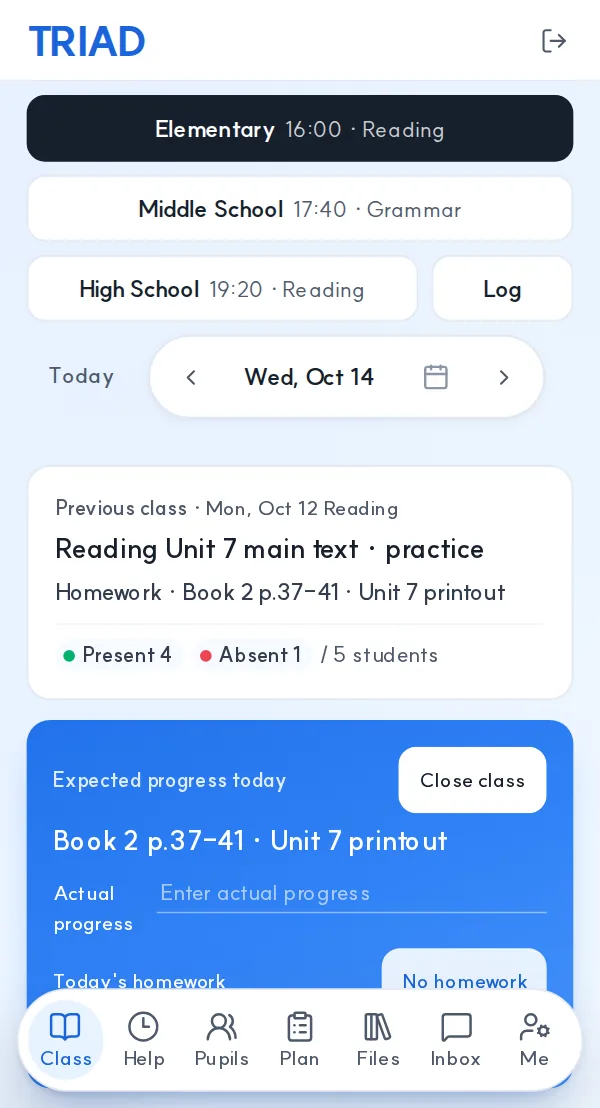
Teachers tap results in on their phones, the owner sees who's behind today, and parents get a clean report.
FILMS
Watch it in a few seconds
Short sample films I made. Tap to play.
Music: Kevin MacLeod — Super Power Cool Dude (CC BY 3.0) · WinnieTheMoog — Space Energy (CC BY 4.0)
WHAT YOU GET
What you get
HOW IT WORKS
How it works
- 01
Tell me how you run things
Class size, staff, and what you track today.
- 02
Pick the first piece
Usually homework/retest tracking or parent reports. Price agreed in writing.
- 03
Try it for a week
Staff use it in real classes, and I fix what gets in the way.
- 04
Hand over
Code, data and a short guide for staff move to you.
START SMALL
Typical projects
- US$20
Worksheet or test automation
e.g. word list → print-ready PDF set.
- from US$60
Sheets-based tracking
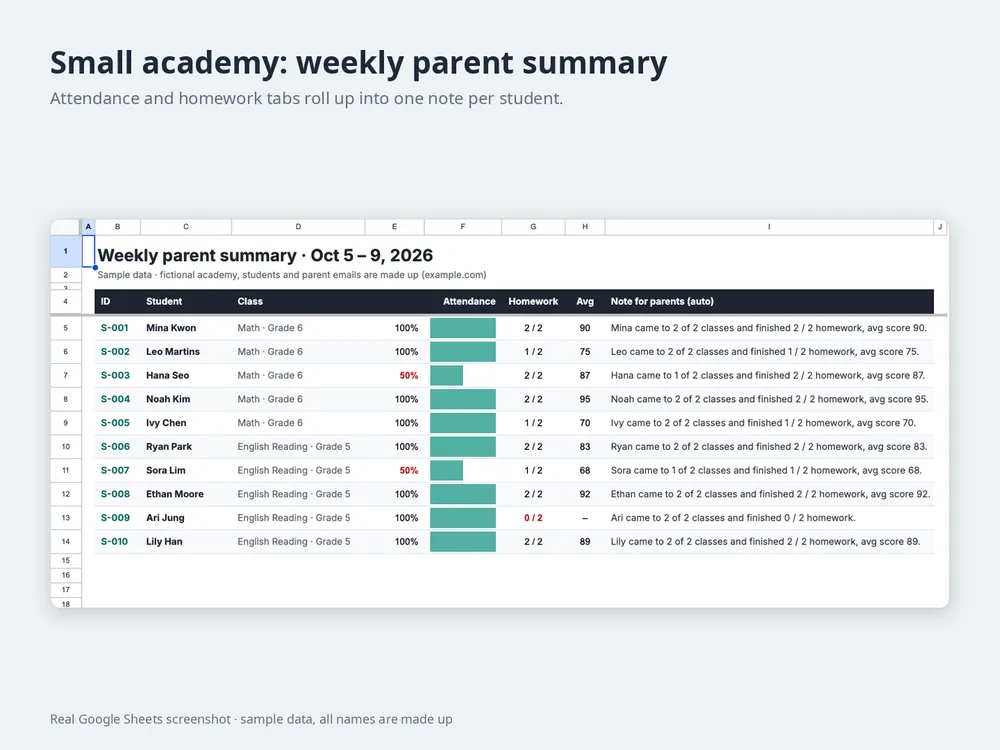
Attendance + homework + a weekly parent summary in Google Sheets.
- quoted per project
Custom LMS pieces
Staff/parent apps like the demo. Scoped per project, about a month at most.
Larger work is US$30/h, scoped in writing first.
Real work: the academy LMS I built (student, parent and staff apps) runs in a real academy every day. The academy stays private, so the public demo uses made-up students.
FAQ
Questions people ask first
Is student data safe?
It stays in your account (Google or your own hosting), not mine. The demo and every sample use made-up names.
Will my teachers need training?
Staff screens are built for phones with a few buttons. We go through it together once, and that's usually enough.
We use Excel. Can we keep our data?
Yes. Your current roster and records are the starting point.
Do I need to know code?
No. You tell me the task in plain words, and screenshots help a lot. You'll use the result like any other sheet or app.
Who owns it?
You do. It's built in your account, and you get the files, the code and a short how-to. No subscription to me.
What takes most of your week at the academy?
One sentence is enough. I reply with a written scope and price.