
- 2026.10.20 Export CSV from Google Sheets without losing IDs or breaking notes You are here
- 2026.10.20 Preview Google Sheets imports by ID before adding order rows
- 2026.10.16 Apps Script triggers: 6 traps that make a script run twice, late, or not at all
- 2026.10.16 ARRAYFORMULA in 2 minutes: 5 one-liners and the traps that fill your sheet with zeros
- 2026.10.15 Google Sheets QUERY cheat sheet: 8 strings I reuse, 4 traps that return nothing
- 2026.10.15 Shift Swap: ask from your phone, one tap to approve, the roster fixes itself
- 2026.10.14 XLOOKUP vs VLOOKUP in Google Sheets: the 2-minute version
- 2026.10.14 Tap Ledger: log a coffee in two taps, total it in Sheets
- 2026.10.14 A habit tracker that can leave the app: check-ins to CSV
- 2026.10.13 Your Dashboard Refreshed. Did Its Source Data?
- 2026.07.28 The Awkward Problems in Calendar-Based Attendance Tracking
- 2026.07.26 How One Shared Sheet Link Leaks Company Data
- 2026.07.23 Bad Form Auto-Replies Damage Customer Trust
- 2026.07.13 ChatGPT API Costs Quietly Leak Money If You Do Not Count Them
- 2026.06.20 Cut Your Monthly SaaS Bill: Rent vs Own Your Automation
- 2026.06.19 How Much Does Adding AI Cost? Estimate Usage Before You Build
- 2026.06.19 Automating Your Work with Google Apps Script — The Complete Guide
- 2026.06.16 How a Multi-User Inspection App Is Different
- 2026.06.10 Inventory in Google Sheets: How Far Automation Goes
- 2026.06.08 Apps Script Costs: No Separate Server, but Plan for Upkeep
- 2026.06.06 Outsource vs Build vs SaaS: Compared by Cost
Export CSV from Google Sheets without losing IDs or breaking notes
Use the values people see, quote commas and line breaks correctly, and import identifier columns as text so leading zeroes survive.

A CSV file can preserve 00127 and keep a note with commas, quotes, or line breaks in one field. The receiving spreadsheet can still turn that ID into 127, so the import step matters too.
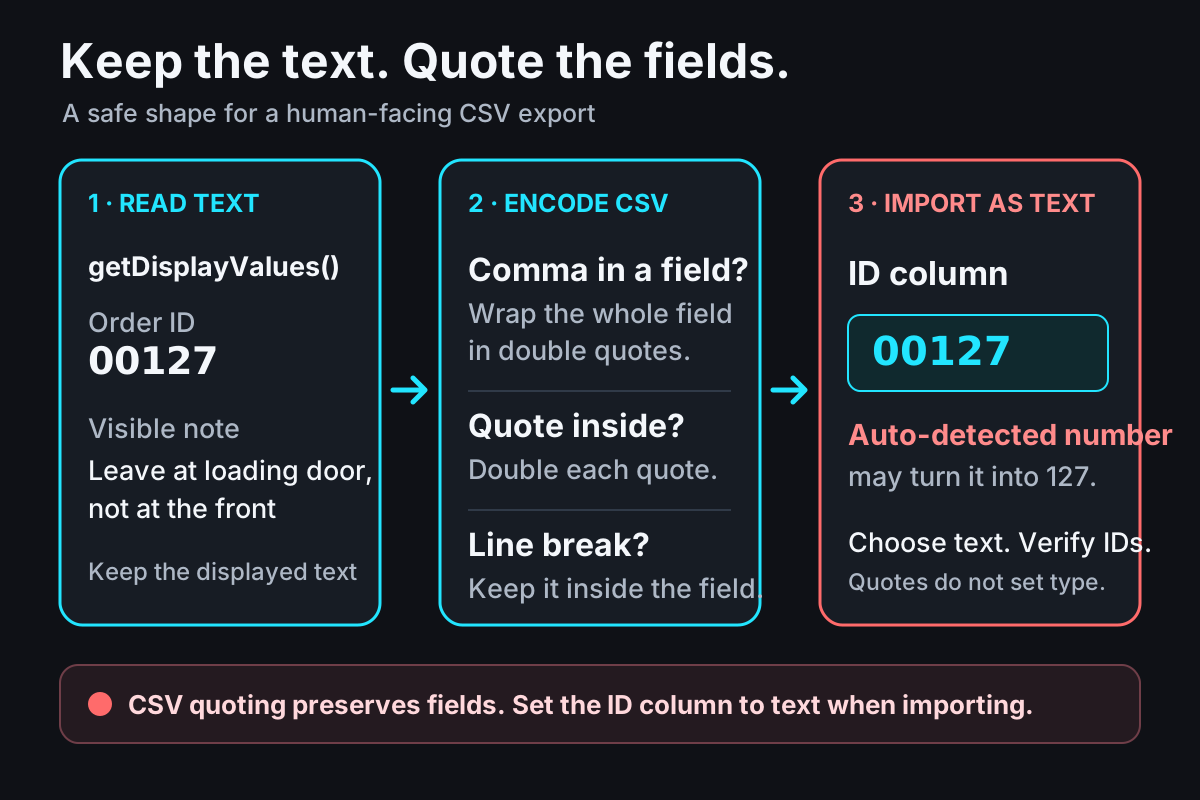
Displayed strings become CSV fields; the recipient still chooses how to type each imported column. View the full-size diagram.
Choose what the export should mean
For a human-facing report, export the value a person sees. In Apps Script, Range.getDisplayValues() returns a two-dimensional grid of strings, including the sheet’s displayed date, currency, and locale formatting. getValues() returns underlying values such as numbers, booleans, dates, and strings, which is usually the better starting point for calculations. See Google’s getDisplayValues() reference.
That difference matters for identifiers. If the cell displays 00127, the display string can carry those characters into the file. The CSV format does not set a spreadsheet cell’s type, though. Some importers will guess that 00127 is a number and drop its leading zeroes. Set the ID column to text in the destination, or turn off automatic number conversion if that option is available, then check a few IDs after import. Quotes around a CSV field protect its structure; they do not force a text type.
Quote fields, not whole rows
CSV uses commas between fields. A field containing a comma, a double quote, or a line break must be quoted; quotes inside it are doubled. This follows the common CSV form in RFC 4180. This small encoder writes CRLF between records and leaves off the final CRLF:
export function encodeCsv(rows, { textSafe = false } = {}) {
  return rows
    .map((row) =>
      row
        .map((value) => {
          const text = value == null ? "" : String(value);
          const prefix = textSafe && /^\s*[=+\-@]/u.test(text) ? "'" : "";
          const escaped = (prefix + text).replace(/"/g, '""');
          return /[",\r\n]/.test(escaped) ? `"${escaped}"` : escaped;
        })
        .join(","),
    )
    .join("\r\n");
}
The test rows below are synthetic. The \r\n marker in the last input cell means a real line break inside that one CSV field.
| Order ID | Customer | Delivery note | CSV note field |
|---|---|---|---|
00127 | Northstar Studio | Leave at loading door, not the front | "Leave at loading door, not the front" |
00128 | Rowan & Co. | Use "gift" label,\r\nthen call on arrival | "Use ""gift"" label,\r\nthen call on arrival" |
00129 | Cedar Shop | (empty cell) | (empty field) |
The output can be inspected locally with Node. Download the runnable CSV encoder, then pass it a two-dimensional array. Empty cells become empty fields; numeric zero becomes 0.
In a bound Apps Script project, paste the same function body into the project (remove the JavaScript module’s export keyword) and wrap it with a small adapter:
function exportOrdersCsv() {
  const sheet = SpreadsheetApp.getActiveSpreadsheet().getSheetByName("Orders");
  if (!sheet) throw new Error("Orders tab not found");
  const rows = sheet.getRange("A1:C4").getDisplayValues();
  const csv = encodeCsv(rows);
  DriveApp.createFile("orders.csv", csv, MimeType.CSV);
}
This wrapper uses Google’s documented sheet and Drive services; it has not been run against a live Google account. Each run creates a new Drive file, so decide where it belongs and how repeated exports should be named before using it regularly.
Keep untrusted input separate
If a CSV will be opened in a spreadsheet, a field beginning with =, +, -, or @ may be treated as a formula. Quoting that field for CSV does not stop formula evaluation. The encoder has an optional textSafe: true mode that prefixes a single quote when a value starts with optional whitespace followed by one of those characters. Use it only when changing the displayed value is acceptable, and test the actual receiving application with representative data. It is a conservative measure, not universal protection: TSV, control characters, alternate separators, and importer rules can behave differently. OWASP’s CSV Injection guidance explains why spreadsheet exports need this extra care.
For a one-off export, send only data you trust or sanitize it for the destination you use. For a small workflow you want to own, send me a short description of the current steps plus a sanitized sample with private details removed. Talk through the workflow.
- 2026.10.20 Export CSV from Google Sheets without losing IDs or breaking notes You are here
- 2026.10.20 Preview Google Sheets imports by ID before adding order rows
- 2026.10.16 Apps Script triggers: 6 traps that make a script run twice, late, or not at all
- 2026.10.16 ARRAYFORMULA in 2 minutes: 5 one-liners and the traps that fill your sheet with zeros
- 2026.10.15 Google Sheets QUERY cheat sheet: 8 strings I reuse, 4 traps that return nothing
- 2026.10.15 Shift Swap: ask from your phone, one tap to approve, the roster fixes itself
- 2026.10.14 XLOOKUP vs VLOOKUP in Google Sheets: the 2-minute version
- 2026.10.14 Tap Ledger: log a coffee in two taps, total it in Sheets
- 2026.10.14 A habit tracker that can leave the app: check-ins to CSV
- 2026.10.13 Your Dashboard Refreshed. Did Its Source Data?
- 2026.07.28 The Awkward Problems in Calendar-Based Attendance Tracking
- 2026.07.26 How One Shared Sheet Link Leaks Company Data
- 2026.07.23 Bad Form Auto-Replies Damage Customer Trust
- 2026.07.13 ChatGPT API Costs Quietly Leak Money If You Do Not Count Them
- 2026.06.20 Cut Your Monthly SaaS Bill: Rent vs Own Your Automation
- 2026.06.19 How Much Does Adding AI Cost? Estimate Usage Before You Build
- 2026.06.19 Automating Your Work with Google Apps Script — The Complete Guide
- 2026.06.16 How a Multi-User Inspection App Is Different
- 2026.06.10 Inventory in Google Sheets: How Far Automation Goes
- 2026.06.08 Apps Script Costs: No Separate Server, but Plan for Upkeep
- 2026.06.06 Outsource vs Build vs SaaS: Compared by Cost