
- 2026.10.20 Export CSV from Google Sheets without losing IDs or breaking notes
- 2026.10.20 Preview Google Sheets imports by ID before adding order rows You are here
- 2026.10.16 Apps Script triggers: 6 traps that make a script run twice, late, or not at all
- 2026.10.16 ARRAYFORMULA in 2 minutes: 5 one-liners and the traps that fill your sheet with zeros
- 2026.10.15 Google Sheets QUERY cheat sheet: 8 strings I reuse, 4 traps that return nothing
- 2026.10.15 Shift Swap: ask from your phone, one tap to approve, the roster fixes itself
- 2026.10.14 XLOOKUP vs VLOOKUP in Google Sheets: the 2-minute version
- 2026.10.14 Tap Ledger: log a coffee in two taps, total it in Sheets
- 2026.10.14 A habit tracker that can leave the app: check-ins to CSV
- 2026.10.13 Your Dashboard Refreshed. Did Its Source Data?
- 2026.07.28 The Awkward Problems in Calendar-Based Attendance Tracking
- 2026.07.26 How One Shared Sheet Link Leaks Company Data
- 2026.07.23 Bad Form Auto-Replies Damage Customer Trust
- 2026.07.13 ChatGPT API Costs Quietly Leak Money If You Do Not Count Them
- 2026.06.20 Cut Your Monthly SaaS Bill: Rent vs Own Your Automation
- 2026.06.19 How Much Does Adding AI Cost? Estimate Usage Before You Build
- 2026.06.19 Automating Your Work with Google Apps Script — The Complete Guide
- 2026.06.16 How a Multi-User Inspection App Is Different
- 2026.06.10 Inventory in Google Sheets: How Far Automation Goes
- 2026.06.08 Apps Script Costs: No Separate Server, but Plan for Upkeep
- 2026.06.06 Outsource vs Build vs SaaS: Compared by Cost
Preview Google Sheets imports by ID before adding order rows
Compare incoming orders with the sheet by a stable business ID, surface duplicates and conflicts, and review every candidate before anything is written.

Use a business ID such as an order number to compare rows. A row number changes when someone sorts the sheet; an order ID stays attached to the order. Make a preview first, and keep the source sheet untouched until a person reviews it.
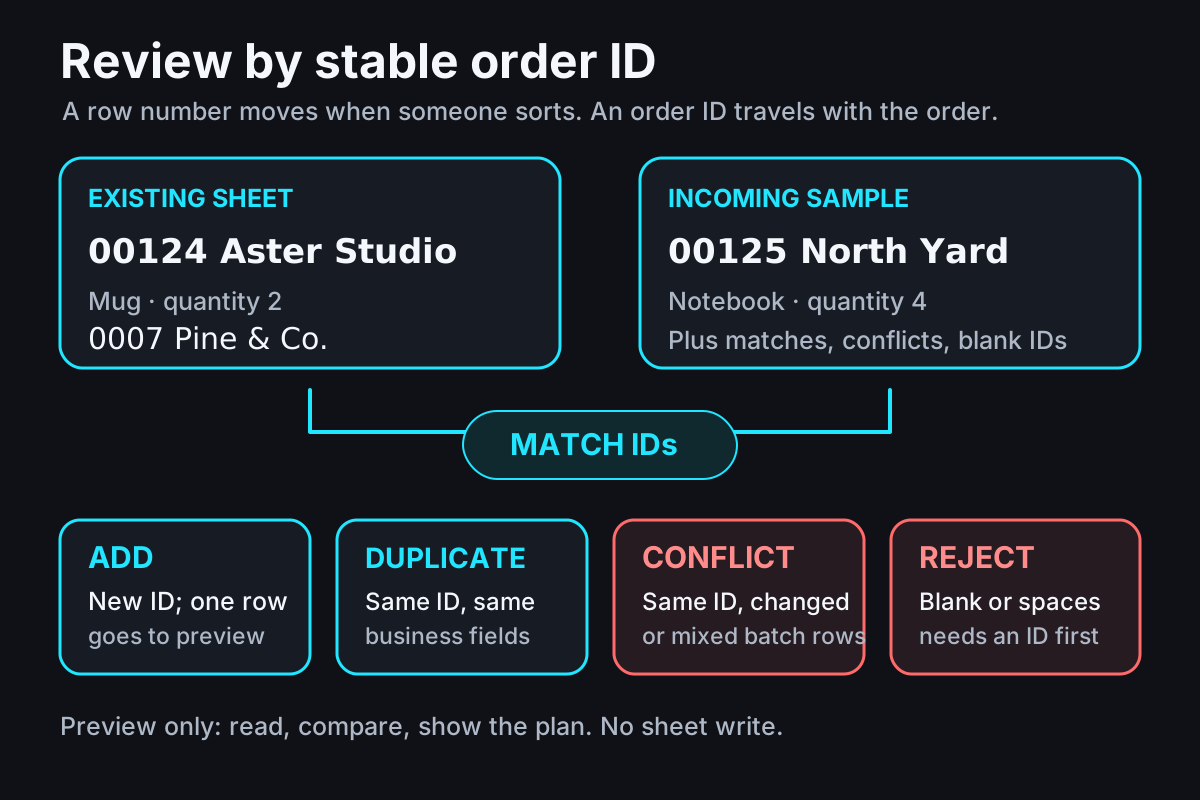
One ID joins the two sets. The preview makes each decision visible before a write is considered. View the full-size diagram.
A small import with four possible results
Suppose a shop keeps orders in a Google Sheet and receives another batch from a form or marketplace export. For each incoming row, the question is not “Which row number looks new?” It is “Does this order ID already exist, and if so, is the rest of the record the same?”
This synthetic example uses text IDs, customer, item, and quantity. Existing rows remain in the preview. One new ID becomes an add candidate; an exact match is a duplicate; a reused ID with different data is a conflict; a blank ID is rejected. The two incoming 00126 rows conflict with each other, so the planner does not pick whichever happened to appear first.
| Source | Order ID | Customer | Item | Quantity | Preview result |
|---|---|---|---|---|---|
| Existing | 00124 | Aster Studio | Blue mug | 2 | Keep existing row |
| Existing | 0007 | Pine & Co. | Candle | 3 | Keep existing row |
| Incoming | 00124 | Aster Studio | Blue mug | 2 | Identical duplicate |
| Incoming | 00125 | North Yard | Notebook | 4 | Add candidate |
| Incoming | 00125 | North Yard | Notebook | 4 | Identical batch duplicate |
| Incoming | 0007 | Pine & Co. | Wick trimmer | 1 | Conflict with existing ID |
| Incoming | 00126 | Harbor Goods | Blue mug | 1 | Conflict within this batch |
| Incoming | 00126 | Harbor Goods | Red mug | 1 | Conflict within this batch |
| Incoming | (blank) | Rowan & Co. | Gift box | 1 | Reject: missing ID |
After planning, previewRows contains the two existing records plus one candidate for 00125. The duplicate rows stay in a separate list. The 0007 and 00126 groups need a person to resolve them, and the blank ID needs to be corrected at its source. Nothing in the example calculates prices, changes inventory, sends messages, or writes to a sheet.
A pure preview function
The downloadable function accepts arrays of flat row objects. It groups incoming and existing records by the exact text of orderId, compares all supplied fields, and returns copies in newRows and previewRows; it does not mutate either input. A text ID like 00124 remains distinct from 124. A numeric 0 is a valid ID; an empty string or whitespace-only ID is not.
Save the downloaded helper as import-preview-example.mjs and the following snippet as preview.mjs in the same folder. Run node preview.mjs. This smaller sample produces one add candidate and empty duplicate, conflict, and reject lists.
import { planOrderImport } from "./import-preview-example.mjs";

const existingRows = [
  { orderId: "00124", customer: "Aster Studio", item: "Blue mug", quantity: 2 },
];
const incomingRows = [
  { orderId: "00125", customer: "North Yard", item: "Notebook", quantity: 4 },
];

const plan = planOrderImport(existingRows, incomingRows);
console.log(plan.newRows);
console.log(plan.identicalDuplicates);
console.log(plan.conflicts);
console.log(plan.rejected);
Download the standalone import preview example. It is ordinary JavaScript and can be run locally with Node using synthetic arrays before anyone connects it to a real spreadsheet. The planner never uses row positions as identity and never deletes or overwrites existing rows.
Pick a comparison rule before sharing the preview
Prefer an immutable identifier from the order source over a customer name plus date. Two genuine orders can share those values, while a name edit should not create a new identity. Keep the ID as text from intake; do not parse it as a number to compare. 00124 and 124 are different keys.
For this helper, records are flat objects with scalar cell values. It compares every supplied field exactly, including value types: numeric 2 and text "2" are different, as are North Yard and North Yard with a trailing space. That strict rule produces a conflict instead of guessing that normalization is safe. If the source has known case or spacing variation, define that rule first, keep the raw value for review, and check for collisions before changing the comparison. When two incoming rows share an ID but differ, the whole group stays in conflicts; the planner never chooses the first row just because it arrived first.
Preview is not a transaction
Two runs can read the same sheet at nearly the same time and both decide that 00125 is new. The pure function cannot reserve that ID or guarantee that a later write will still be valid. Treat its result as a review list, not a concurrency lock or a promise that the sheet has not changed.
If you later add a write step, every writer in the same Apps Script project should use the same script lock, reread the sheet while holding that lock, and build a fresh plan before applying approved rows. Google notes that spreadsheet changes should be flushed before the lock is released. The lock coordinates cooperating Apps Script executions; edits or API clients that do not use that project lock are outside it. See Google’s LockService and Lock references. The linked trigger guide covers why repeat runs and locks need an explicit design.
For a small import workflow, send the current steps, the decision you want for each duplicate case, and a sanitized sample that contains no real customer details. Talk through the workflow.
- 2026.10.20 Export CSV from Google Sheets without losing IDs or breaking notes
- 2026.10.20 Preview Google Sheets imports by ID before adding order rows You are here
- 2026.10.16 Apps Script triggers: 6 traps that make a script run twice, late, or not at all
- 2026.10.16 ARRAYFORMULA in 2 minutes: 5 one-liners and the traps that fill your sheet with zeros
- 2026.10.15 Google Sheets QUERY cheat sheet: 8 strings I reuse, 4 traps that return nothing
- 2026.10.15 Shift Swap: ask from your phone, one tap to approve, the roster fixes itself
- 2026.10.14 XLOOKUP vs VLOOKUP in Google Sheets: the 2-minute version
- 2026.10.14 Tap Ledger: log a coffee in two taps, total it in Sheets
- 2026.10.14 A habit tracker that can leave the app: check-ins to CSV
- 2026.10.13 Your Dashboard Refreshed. Did Its Source Data?
- 2026.07.28 The Awkward Problems in Calendar-Based Attendance Tracking
- 2026.07.26 How One Shared Sheet Link Leaks Company Data
- 2026.07.23 Bad Form Auto-Replies Damage Customer Trust
- 2026.07.13 ChatGPT API Costs Quietly Leak Money If You Do Not Count Them
- 2026.06.20 Cut Your Monthly SaaS Bill: Rent vs Own Your Automation
- 2026.06.19 How Much Does Adding AI Cost? Estimate Usage Before You Build
- 2026.06.19 Automating Your Work with Google Apps Script — The Complete Guide
- 2026.06.16 How a Multi-User Inspection App Is Different
- 2026.06.10 Inventory in Google Sheets: How Far Automation Goes
- 2026.06.08 Apps Script Costs: No Separate Server, but Plan for Upkeep
- 2026.06.06 Outsource vs Build vs SaaS: Compared by Cost