
- 2026.10.20 Export CSV from Google Sheets without losing IDs or breaking notes
- 2026.10.20 Preview Google Sheets imports by ID before adding order rows
- 2026.10.16 Apps Script triggers: 6 traps that make a script run twice, late, or not at all
- 2026.10.16 ARRAYFORMULA in 2 minutes: 5 one-liners and the traps that fill your sheet with zeros
- 2026.10.15 Google Sheets QUERY cheat sheet: 8 strings I reuse, 4 traps that return nothing
- 2026.10.15 Shift Swap: ask from your phone, one tap to approve, the roster fixes itself
- 2026.10.14 XLOOKUP vs VLOOKUP in Google Sheets: the 2-minute version You are here
- 2026.10.14 Tap Ledger: log a coffee in two taps, total it in Sheets
- 2026.10.14 A habit tracker that can leave the app: check-ins to CSV
- 2026.10.13 Your Dashboard Refreshed. Did Its Source Data?
- 2026.07.28 The Awkward Problems in Calendar-Based Attendance Tracking
- 2026.07.26 How One Shared Sheet Link Leaks Company Data
- 2026.07.23 Bad Form Auto-Replies Damage Customer Trust
- 2026.07.13 ChatGPT API Costs Quietly Leak Money If You Do Not Count Them
- 2026.06.20 Cut Your Monthly SaaS Bill: Rent vs Own Your Automation
- 2026.06.19 How Much Does Adding AI Cost? Estimate Usage Before You Build
- 2026.06.19 Automating Your Work with Google Apps Script — The Complete Guide
- 2026.06.16 How a Multi-User Inspection App Is Different
- 2026.06.10 Inventory in Google Sheets: How Far Automation Goes
- 2026.06.08 Apps Script Costs: No Separate Server, but Plan for Upkeep
- 2026.06.06 Outsource vs Build vs SaaS: Compared by Cost
XLOOKUP vs VLOOKUP in Google Sheets: the 2-minute version
Lookups I ran in a real Google Sheet: where VLOOKUP quietly returns the wrong value, and the XLOOKUP version that doesn't.

XLOOKUP searches the SKU range and returns the matching price
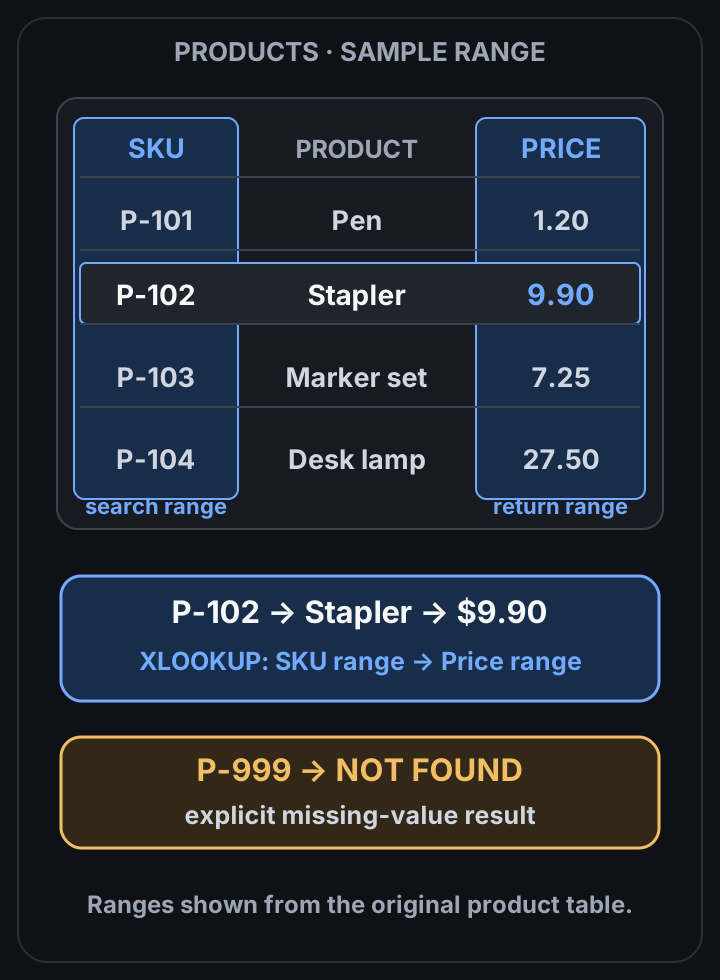 View full-size diagram
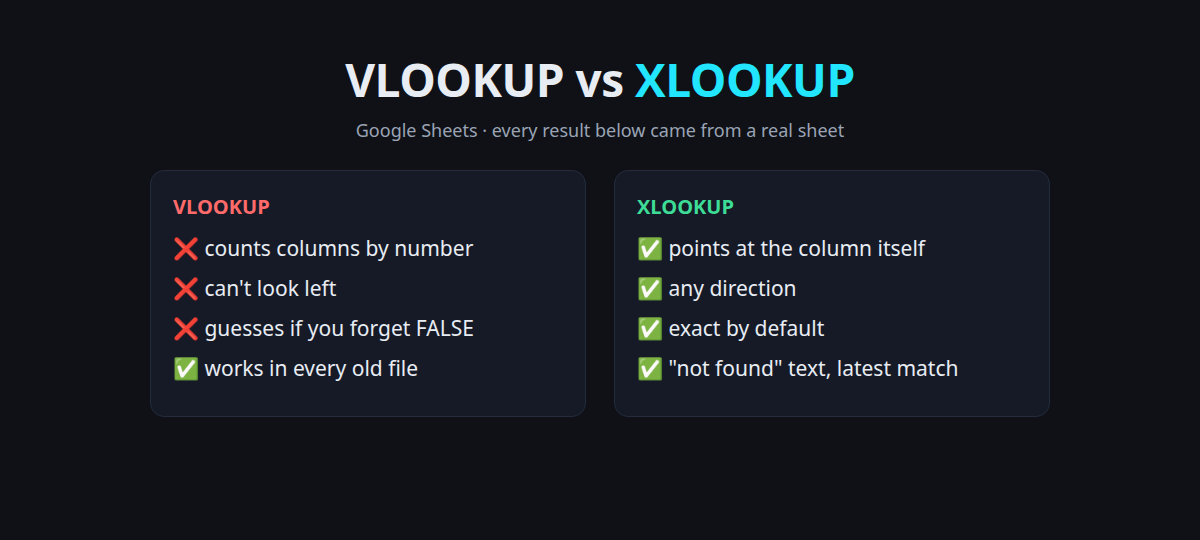
Use XLOOKUP for new sheets. VLOOKUP isn’t broken, but it counts columns by number and guesses when you forget FALSE. Both mistakes give you a wrong answer instead of an error.
I ran every formula below in a scratch Google Sheet on 2026-10-14. The results are what Sheets actually returned.
The test sheet
A tiny product list on a tab called Products:
| Row | A: SKU | B: Product | C: Price | D: Stock |
|---|---|---|---|---|
| 2 | P-100 | Notebook | 4.50 | 12 |
| 3 | P-101 | Pen (blue) | 1.20 | 40 |
| 4 | P-102 | Stapler | 9.90 | 0 |
| 5 | P-103 | Marker set | 7.25 | 5 |
| 6 | P-104 | Desk lamp | 27.50 | 3 |
Side by side
| Job | VLOOKUP | XLOOKUP | What I got |
|---|---|---|---|
| Price of P-102 | =VLOOKUP("P-102",A2:D6,3,FALSE) | =XLOOKUP("P-102",A2:A6,C2:C6) | 9.9 / 9.9 |
| SKU of “Stapler” (look left) | =VLOOKUP("Stapler",A2:D6,1,FALSE) | =XLOOKUP("Stapler",B2:B6,A2:A6) | #N/A / P-102 |
| Missing SKU | =VLOOKUP("P-999",A2:D6,3,FALSE) | =XLOOKUP("P-999",A2:A6,C2:C6,"not found") | #N/A / not found |
| Whole row for P-103 | three formulas | =XLOOKUP("P-103",A2:A6,B2:D6) | Marker set, 7.25, 5 |
VLOOKUP only searches the first column of its range, so it can’t find “Stapler” and walk left to the SKU. XLOOKUP has a separate search range and result range, so direction doesn’t matter.
Trap 1: one inserted column
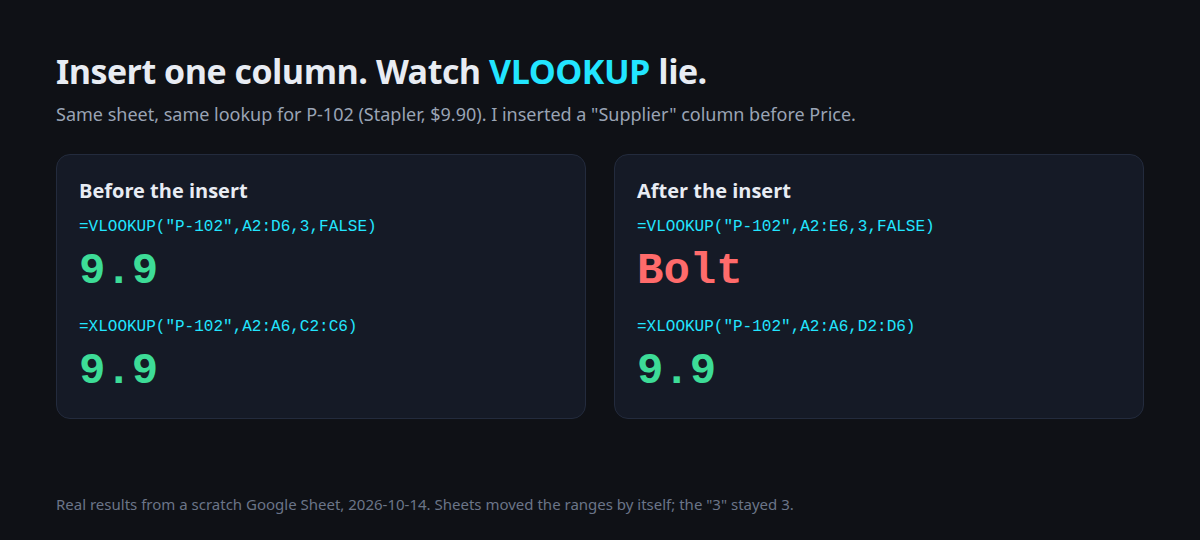
I inserted a Supplier column between Product and Price. Sheets updated both ranges by itself, but VLOOKUP’s 3 stayed 3.
Column 3 is now Supplier, so the “price” became Bolt. No error, no warning, just a supplier name where a number should be.
XLOOKUP pointed at the Price column itself (C2:C6 became D2:D6) and still returned 9.9.
Trap 2: forgetting FALSE
=VLOOKUP("P-105", A2:D6, 3)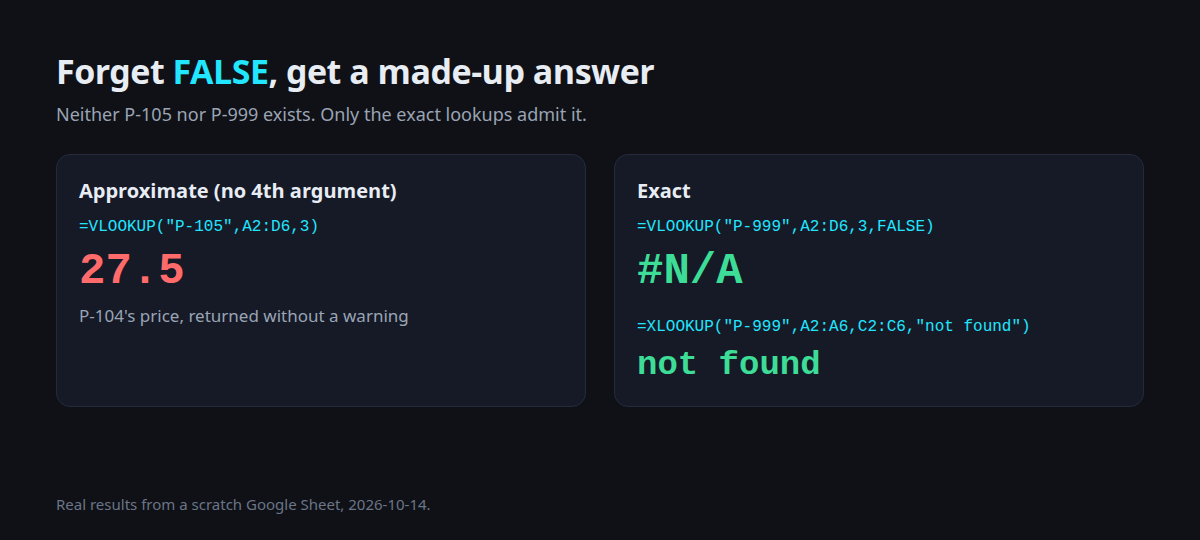
P-105 doesn’t exist. Without the fourth argument VLOOKUP does an approximate match, so it returned 27.5, the price of P-104. A made-up product, a real-looking price.
XLOOKUP is exact by default. You only get approximate matching when you ask for it.
When you do want “closest”: discount tiers
Approximate matching is useful for tiers. A Tiers tab:
| Min order | Discount |
|---|---|
| 0 | 0% |
| 50 | 5% |
| 100 | 10% |
| 200 | 15% |
=XLOOKUP(130, Tiers!A2:A5, Tiers!B2:B5, , -1)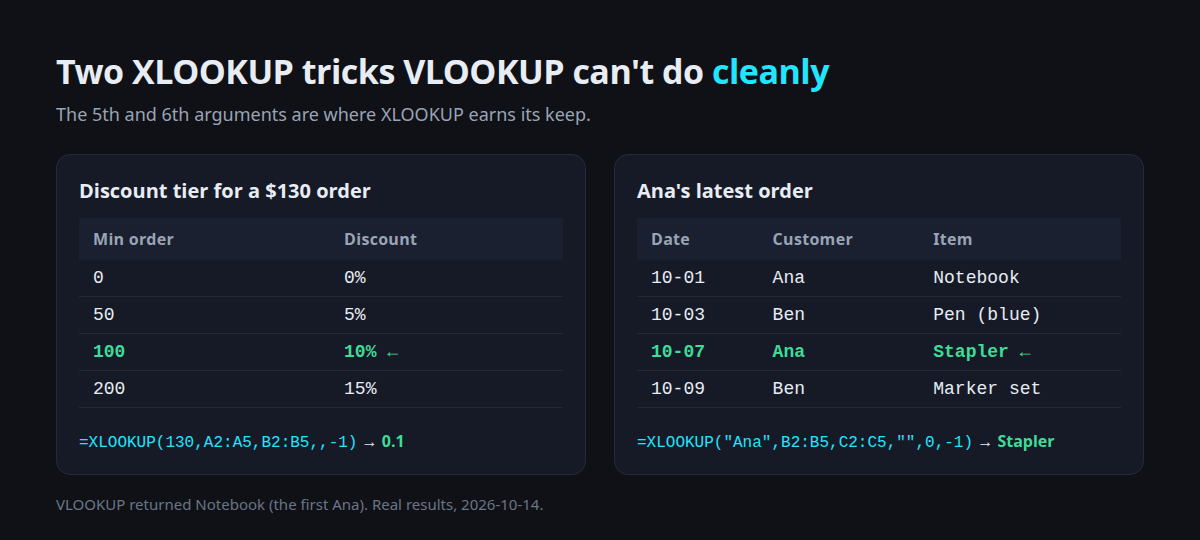
The -1 means “exact, or the next smaller value”. An order of 130 got 0.1 (10%). =VLOOKUP(130,Tiers!A2:B5,2,TRUE) also gave 0.1, but only because the tiers are sorted ascending. XLOOKUP’s -1 doesn’t require sorting.
Bonus: the latest match, not the first
An order log with Ana on Oct 1 (Notebook) and again on Oct 7 (Stapler):
=XLOOKUP("Ana", Log!B2:B5, Log!C2:C5, "", 0, -1)The last -1 searches bottom-up, so it returned Stapler, her latest order. VLOOKUP("Ana",…,FALSE) returned Notebook, the first one.
One that gets both of them
=XLOOKUP("Notebook ", B2:B6, C2:C6, "not found")   → not found
=XLOOKUP(TRIM("Notebook "), B2:B6, C2:C6, "not found")   → 4.5
A trailing space (very common after copy-paste from email) breaks exact matching in both functions. TRIM the key, or clean the column once.
Cheat sheet
| You want | Write |
|---|---|
| Exact lookup | =XLOOKUP(key, search_col, result_col) |
| Friendly miss | add , "not found" as 4th argument |
| Several columns | make the result range wider: B2:D6 |
| Tiers / brackets | , , -1 (next smaller) |
| Latest entry | , "", 0, -1 (search from bottom) |
| Old file with VLOOKUP | always end with , FALSE |
If a sheet is shared with Excel users on old versions, VLOOKUP with FALSE is still fine. Just don’t hard-code the column number in a sheet people add columns to.
Got a sheet where lookups keep breaking every time someone adds a column? Send me what it does, and I’ll tell you whether a formula fix is enough or it needs a small script.
- 2026.10.20 Export CSV from Google Sheets without losing IDs or breaking notes
- 2026.10.20 Preview Google Sheets imports by ID before adding order rows
- 2026.10.16 Apps Script triggers: 6 traps that make a script run twice, late, or not at all
- 2026.10.16 ARRAYFORMULA in 2 minutes: 5 one-liners and the traps that fill your sheet with zeros
- 2026.10.15 Google Sheets QUERY cheat sheet: 8 strings I reuse, 4 traps that return nothing
- 2026.10.15 Shift Swap: ask from your phone, one tap to approve, the roster fixes itself
- 2026.10.14 XLOOKUP vs VLOOKUP in Google Sheets: the 2-minute version You are here
- 2026.10.14 Tap Ledger: log a coffee in two taps, total it in Sheets
- 2026.10.14 A habit tracker that can leave the app: check-ins to CSV
- 2026.10.13 Your Dashboard Refreshed. Did Its Source Data?
- 2026.07.28 The Awkward Problems in Calendar-Based Attendance Tracking
- 2026.07.26 How One Shared Sheet Link Leaks Company Data
- 2026.07.23 Bad Form Auto-Replies Damage Customer Trust
- 2026.07.13 ChatGPT API Costs Quietly Leak Money If You Do Not Count Them
- 2026.06.20 Cut Your Monthly SaaS Bill: Rent vs Own Your Automation
- 2026.06.19 How Much Does Adding AI Cost? Estimate Usage Before You Build
- 2026.06.19 Automating Your Work with Google Apps Script — The Complete Guide
- 2026.06.16 How a Multi-User Inspection App Is Different
- 2026.06.10 Inventory in Google Sheets: How Far Automation Goes
- 2026.06.08 Apps Script Costs: No Separate Server, but Plan for Upkeep
- 2026.06.06 Outsource vs Build vs SaaS: Compared by Cost