
- 2026.10.20 Export CSV from Google Sheets without losing IDs or breaking notes
- 2026.10.20 Preview Google Sheets imports by ID before adding order rows
- 2026.10.16 Apps Script triggers: 6 traps that make a script run twice, late, or not at all You are here
- 2026.10.16 ARRAYFORMULA in 2 minutes: 5 one-liners and the traps that fill your sheet with zeros
- 2026.10.15 Google Sheets QUERY cheat sheet: 8 strings I reuse, 4 traps that return nothing
- 2026.10.15 Shift Swap: ask from your phone, one tap to approve, the roster fixes itself
- 2026.10.14 XLOOKUP vs VLOOKUP in Google Sheets: the 2-minute version
- 2026.10.14 Tap Ledger: log a coffee in two taps, total it in Sheets
- 2026.10.14 A habit tracker that can leave the app: check-ins to CSV
- 2026.10.13 Your Dashboard Refreshed. Did Its Source Data?
- 2026.07.28 The Awkward Problems in Calendar-Based Attendance Tracking
- 2026.07.26 How One Shared Sheet Link Leaks Company Data
- 2026.07.23 Bad Form Auto-Replies Damage Customer Trust
- 2026.07.13 ChatGPT API Costs Quietly Leak Money If You Do Not Count Them
- 2026.06.20 Cut Your Monthly SaaS Bill: Rent vs Own Your Automation
- 2026.06.19 How Much Does Adding AI Cost? Estimate Usage Before You Build
- 2026.06.19 Automating Your Work with Google Apps Script — The Complete Guide
- 2026.06.16 How a Multi-User Inspection App Is Different
- 2026.06.10 Inventory in Google Sheets: How Far Automation Goes
- 2026.06.08 Apps Script Costs: No Separate Server, but Plan for Upkeep
- 2026.06.06 Outsource vs Build vs SaaS: Compared by Cost
Apps Script triggers: 6 traps that make a script run twice, late, or not at all
Simple onEdit vs installable triggers, the 9 AM trigger that runs at 9:40, stacked triggers, and the Status column + lock pattern I use so a repeat run never sends anything twice.

A human edit and a script write trigger different paths
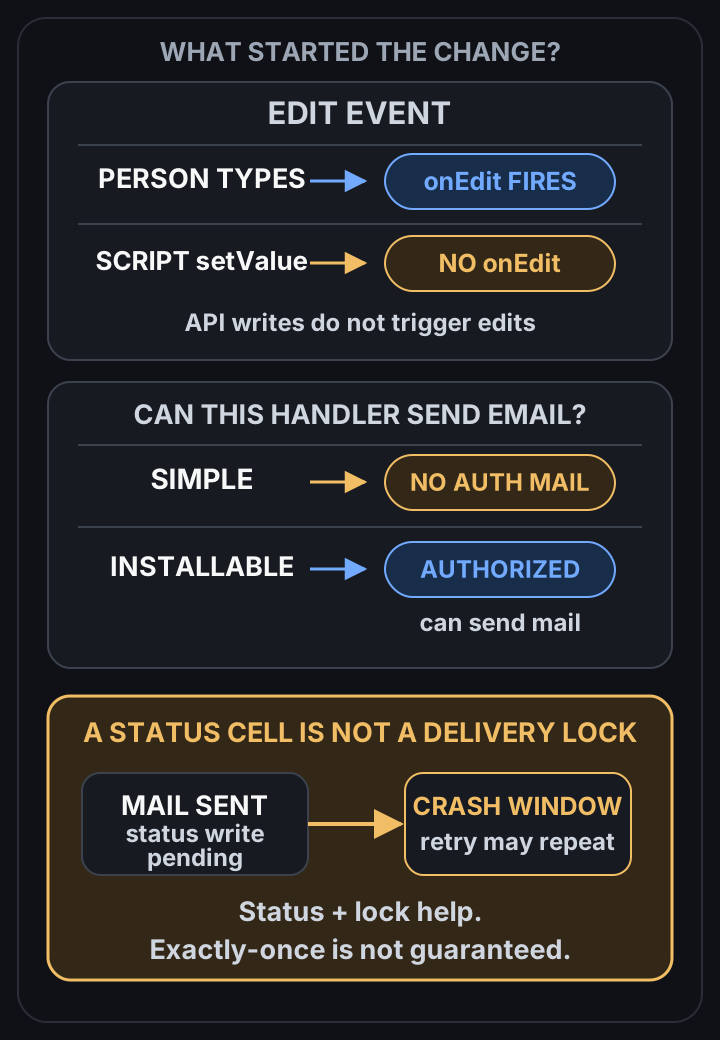 View full-size diagram
Most “my Apps Script is haunted” moments are trigger rules, not bugs. A simple onEdit can’t send email. Nothing fires when a script writes to the sheet. A “9 AM” trigger runs some time between 9 and 10. And running your setup function twice gives you two triggers.
Write a Status column and take a lock, and none of that can double-send.
The trigger rules below come from Google’s Apps Script docs (triggers, installable triggers, quotas), checked on 2026-10-16. The script at the end I ran in Node with stand-in Sheet, Mail, Lock and Trigger objects. That tests the logic, not Google’s servers, so I say which is which.
Two kinds of trigger
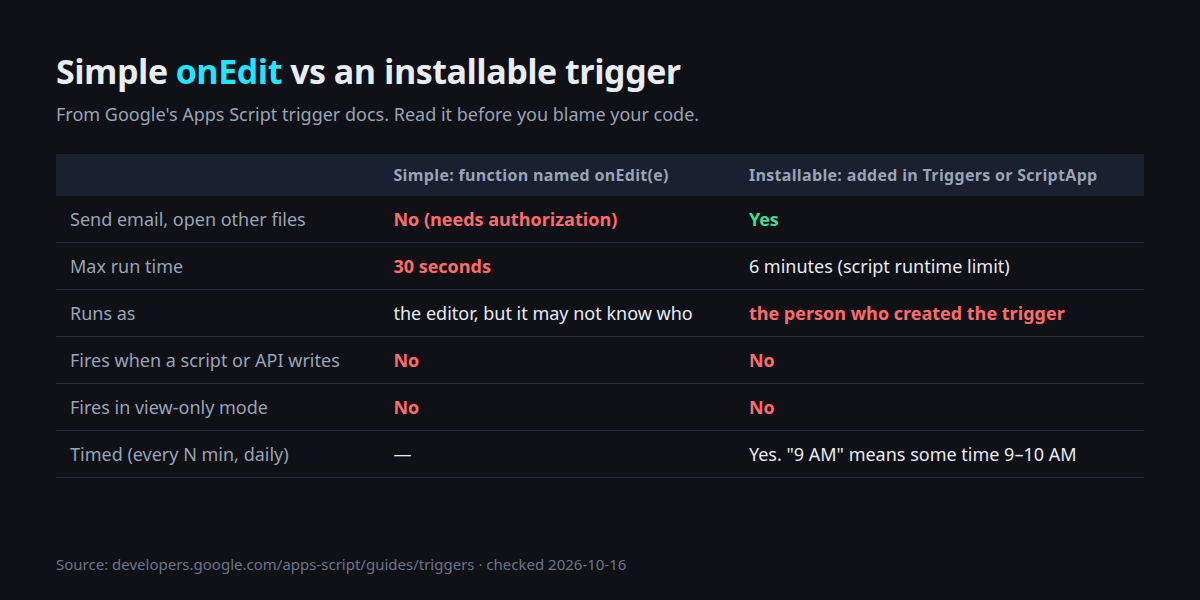
A simple trigger is just a function with a reserved name, like onEdit(e) or onOpen(e). You don’t set anything up, it just runs.
An installable trigger is one you add yourself, in the editor’s Triggers page (the clock icon) or with ScriptApp.newTrigger(). It asks for permission once, then it can do much more.
That difference is behind most of the traps.
Trap 1: onEdit can’t send the email
You write onEdit(e), check the edited cell, call MailApp.sendEmail(). Nothing arrives.
Google’s docs say simple triggers can’t use services that need authorization. Their own example is exactly this: a simple trigger can’t send an email.
They also can’t open other files, and they stop after 30 seconds.
Fix: rename the function (say handleEdit) and add it as an installable On edit trigger. Give it its own name, not onEdit, so there’s no doubt which one is running.
Trap 2: a script writes the cell, and nothing fires
This one confuses everyone. Your form-processing script writes “Approved” into column F, and your onEdit-based “send when Approved” never runs.
From the docs: script executions and API requests don’t cause triggers to run.
Range.setValue() doesn’t fire onEdit, simple or installable. Only a person typing does.
Fix: don’t chain triggers through the sheet. If your script writes “Approved”, call the send function right there, in the same script. Or let a timed trigger sweep the sheet every few minutes for rows that need work (that’s the pattern at the end).
Trap 3: the email comes from your account
Installable triggers always run as the person who created them.
If you set up the trigger and your colleague edits the sheet, the email goes out from your Gmail and counts against your quota.
For a shared sheet that’s usually what you want, as long as everyone knows. Write it on the README tab: “Reminders send from haemin@…”. When you hand the sheet over to someone, they should delete your trigger and create their own.
Trap 4: “9 AM” means 9-something
A daily trigger set with .atHour(9) doesn’t run at 9:00. The docs say Apps Script picks a time between 9 and 10, then keeps it consistent day to day. .nearMinute(30) narrows it to plus or minus 15 minutes.
So “remind parents at 9:00 sharp” isn’t something a time trigger promises. If the time matters, schedule earlier, or run every 5 or 10 minutes and let the script check the clock.
Trap 5: you ran setup twice, now it runs twice
ScriptApp.newTrigger(...).create() adds a new trigger every time it runs. Run your setup function again after a small edit, and you have two identical triggers. Every email now goes out twice and the code looks perfect.
In my stand-in test, calling a plain newTrigger three times left 3 triggers. The setUpTrigger() below deletes its own old trigger first, and three calls left 1.
There’s also a cap of 20 triggers per user per script, so stacking them eventually fails loudly too.
Trap 6: the 6-minute wall
One execution can run for 6 minutes. On a free gmail.com account, all your triggers together get 90 minutes per day (Google Workspace accounts get 6 hours).
A script that loops through 2,000 rows and sends an email for each will hit the wall halfway and stop. Then the next run starts again from row 2.
Fix: remember what’s done (Status column) and stop yourself before Google stops you.
The pattern: Status column + lock + time budget
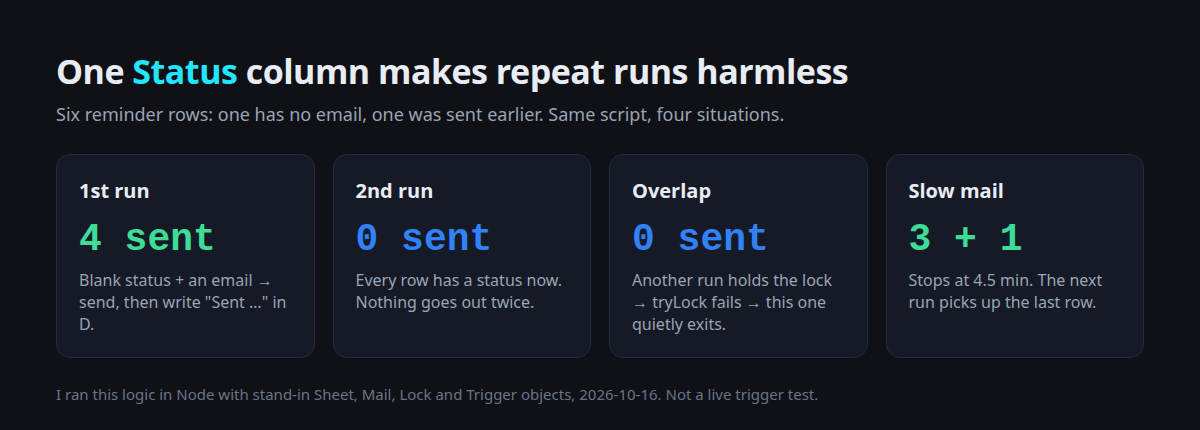
A Reminders tab: A Name, B Email, C Due, D Status. The script sends to every row with an email and a blank status, then writes the status.
const HANDLER = 'sendReminders';

// Run this from the editor as often as you like: it never stacks triggers.
function setUpTrigger() {
  ScriptApp.getProjectTriggers()
    .filter(t => t.getHandlerFunction() === HANDLER)
    .forEach(t => ScriptApp.deleteTrigger(t));
  ScriptApp.newTrigger(HANDLER).timeBased().everyMinutes(10).create();
}

function sendReminders() {
  const lock = LockService.getScriptLock();
  if (!lock.tryLock(1000)) return;          // another run is busy: skip this one
  try {
    const started = Date.now();
    const sheet = SpreadsheetApp.getActive().getSheetByName('Reminders');
    const rows = sheet.getDataRange().getValues();   // A Name, B Email, C Due, D Status
    for (let i = 1; i < rows.length; i++) {
      const [name, email, due, status] = rows[i];
      if (status || !email) continue;               // done already, or nothing to send
      if (Date.now() - started > 4.5 * 60 * 1000) break;  // leave room before 6 min
      MailApp.sendEmail(email, 'Reminder: ' + due, 'Hi ' + name + ', just a reminder.');
      sheet.getRange(i + 1, 4).setValue('Sent ' + new Date().toISOString());
    }
  } finally {
    lock.releaseLock();
  }
}
What each part protects against:
- Status column. A row is done when D has a value. Run it again, by trigger, by hand, or by a duplicate trigger, and done rows are skipped. You can also see in the sheet what went out and when.
tryLock. If a slow run is still going when the next one starts, the second one exits instead of reading the same blank rows. I usedtryLock(give up after 1 second) rather thanwaitLockbecause the next 10-minute run will catch up anyway.- Time budget. It stops at 4.5 minutes, leaving room before the 6-minute limit. The rows it didn’t reach still have a blank status, so the next run starts there.
What I actually ran
Six rows: Mina, Leo, Sara (no email), Jun (status already “Sent earlier”), Ara, Ben. Results from the stand-in run:
| Situation | Sent |
|---|---|
| First run | Mina, Leo, Ara, Ben (Sara skipped, Jun skipped) |
| Second run right after | nothing |
| Run while another run holds the lock | nothing |
| Each email takes 100 s (fake clock) | Mina, Leo, Ara, then stop. Next run: Ben |
setUpTrigger() called 3 times | 1 trigger |
The stand-ins only fake getValues, setValue, sendEmail, tryLock and the trigger list. They don’t prove how Google schedules things. That part is the docs above.

Two habits I keep in my own sheets
In the academy texting sheet I built for my own use, I do the same two things.
The “turn on auto-send” menu deletes the old trigger before making a new one. And every text writes a key (student, rule, date) into a log tab, which is checked before sending, so one rule can’t text the same parent twice in a day.
The idea is the same as the Status column, just with a separate log.
Checklist before you trust a trigger
| Check | Why |
|---|---|
| Does it send mail or touch other files? | Then it must be installable, not onEdit |
| Does a script write the cell you’re watching? | Then no trigger will fire on it |
| Whose account created the trigger? | Mail comes from them, and it breaks if they leave |
| Is the time exact? | “9 AM” is any time 9–10 |
| How many triggers are in the Triggers page? | Duplicates mean duplicate runs |
| What if it stops halfway? | Status column + lock means you just run it again |
If you’re still fighting with sheet formulas first, the ARRAYFORMULA two-minute guide and the QUERY cheat sheet cover the formula side.
Have a script that sends twice, late, or never? Tell me what it’s supposed to do, and I’ll take a look at the triggers first.
- 2026.10.20 Export CSV from Google Sheets without losing IDs or breaking notes
- 2026.10.20 Preview Google Sheets imports by ID before adding order rows
- 2026.10.16 Apps Script triggers: 6 traps that make a script run twice, late, or not at all You are here
- 2026.10.16 ARRAYFORMULA in 2 minutes: 5 one-liners and the traps that fill your sheet with zeros
- 2026.10.15 Google Sheets QUERY cheat sheet: 8 strings I reuse, 4 traps that return nothing
- 2026.10.15 Shift Swap: ask from your phone, one tap to approve, the roster fixes itself
- 2026.10.14 XLOOKUP vs VLOOKUP in Google Sheets: the 2-minute version
- 2026.10.14 Tap Ledger: log a coffee in two taps, total it in Sheets
- 2026.10.14 A habit tracker that can leave the app: check-ins to CSV
- 2026.10.13 Your Dashboard Refreshed. Did Its Source Data?
- 2026.07.28 The Awkward Problems in Calendar-Based Attendance Tracking
- 2026.07.26 How One Shared Sheet Link Leaks Company Data
- 2026.07.23 Bad Form Auto-Replies Damage Customer Trust
- 2026.07.13 ChatGPT API Costs Quietly Leak Money If You Do Not Count Them
- 2026.06.20 Cut Your Monthly SaaS Bill: Rent vs Own Your Automation
- 2026.06.19 How Much Does Adding AI Cost? Estimate Usage Before You Build
- 2026.06.19 Automating Your Work with Google Apps Script — The Complete Guide
- 2026.06.16 How a Multi-User Inspection App Is Different
- 2026.06.10 Inventory in Google Sheets: How Far Automation Goes
- 2026.06.08 Apps Script Costs: No Separate Server, but Plan for Upkeep
- 2026.06.06 Outsource vs Build vs SaaS: Compared by Cost