
- 2026.10.20 Export CSV from Google Sheets without losing IDs or breaking notes
- 2026.10.20 Preview Google Sheets imports by ID before adding order rows
- 2026.10.16 Apps Script triggers: 6 traps that make a script run twice, late, or not at all
- 2026.10.16 ARRAYFORMULA in 2 minutes: 5 one-liners and the traps that fill your sheet with zeros
- 2026.10.15 Google Sheets QUERY cheat sheet: 8 strings I reuse, 4 traps that return nothing
- 2026.10.15 Shift Swap: ask from your phone, one tap to approve, the roster fixes itself
- 2026.10.14 XLOOKUP vs VLOOKUP in Google Sheets: the 2-minute version
- 2026.10.14 Tap Ledger: log a coffee in two taps, total it in Sheets
- 2026.10.14 A habit tracker that can leave the app: check-ins to CSV
- 2026.10.13 Your Dashboard Refreshed. Did Its Source Data?
- 2026.07.28 The Awkward Problems in Calendar-Based Attendance Tracking
- 2026.07.26 How One Shared Sheet Link Leaks Company Data
- 2026.07.23 Bad Form Auto-Replies Damage Customer Trust
- 2026.07.13 ChatGPT API Costs Quietly Leak Money If You Do Not Count Them
- 2026.06.20 Cut Your Monthly SaaS Bill: Rent vs Own Your Automation
- 2026.06.19 How Much Does Adding AI Cost? Estimate Usage Before You Build You are here
- 2026.06.19 Automating Your Work with Google Apps Script — The Complete Guide
- 2026.06.16 How a Multi-User Inspection App Is Different
- 2026.06.10 Inventory in Google Sheets: How Far Automation Goes
- 2026.06.08 Apps Script Costs: No Separate Server, but Plan for Upkeep
- 2026.06.06 Outsource vs Build vs SaaS: Compared by Cost
How Much Does Adding AI Cost? Estimate Usage Before You Build
Estimate AI usage alongside setup, maintenance, subscriptions and connected services. Start with a small sample and a spending limit; check current provider rates before adding an API.

See who pays and who approves the draft
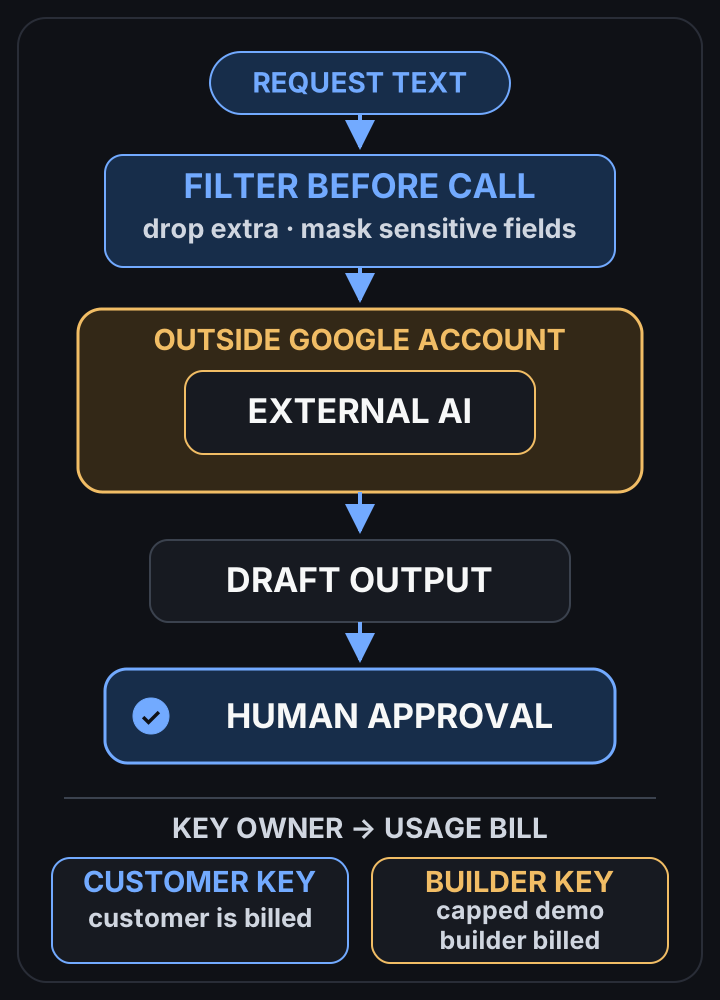 View full-size diagram
Conclusion first: A small Apps Script workflow may fit within your existing account and quotas, but that does not make setup or maintenance free. An AI API can add usage charges alongside subscriptions or other connected services. For a first estimate, how about measuring a small sample with the intended model and a spending limit?
What to include in the estimate
Check the whole workflow: account subscriptions, quotas, connected services, setup and maintenance. If an AI API is involved, check its current billing terms too. A low API bill alone does not establish the total cost.
The three things that set the cost
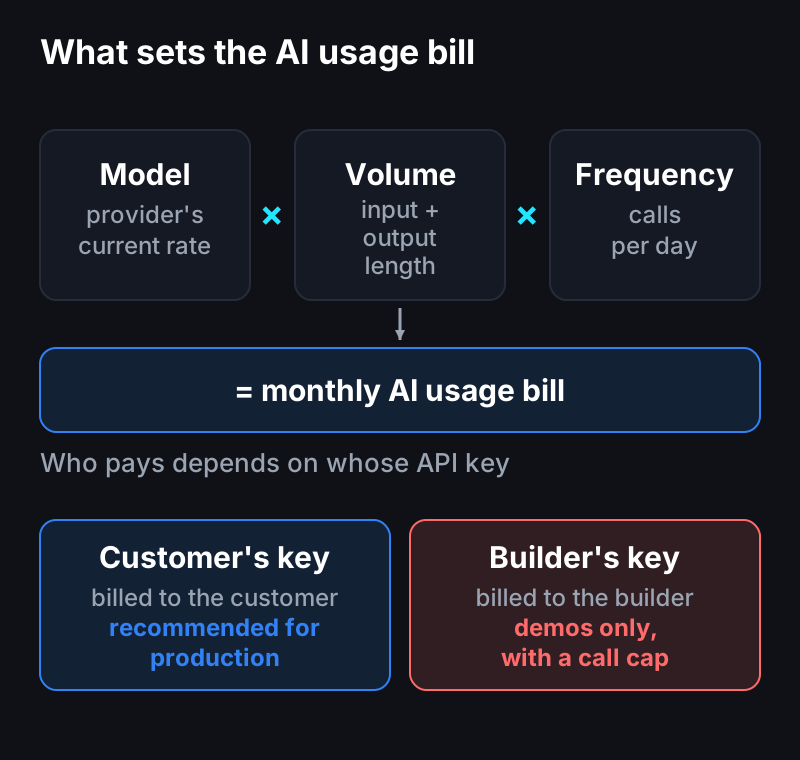
- Model — check current provider rates and try a small sample before choosing.
- Volume — cost scales with the number of characters processed. Longer input and longer output cost more.
- Frequency — calls per day × length per call. That product is your monthly bill.
I cannot give a reliable monthly figure without the provider, model and workload. A small sample can help estimate input, output, retries and call frequency. Compare that estimate with the current billing terms before agreeing on a budget.
Whose key — the most important operational call
Calling AI needs an “API key,” and usage is billed to that key. Whose key you use decides who carries the cost.
| Setup | Who pays usage | When |
|---|---|---|
| Customer’s key | Customer (their own AI account) | Recommended for production. Matches “build once, own it”; cost is transparent |
| Builder’s key | The builder | Demos and trials only. Always cap the usage |
For a production app, having the customer enter their own AI account key is cleanest. Usage bills straight to them, so the builder never absorbs someone else’s costs by accident. For a public demo, run a light model with a hard call cap.
Where the data goes
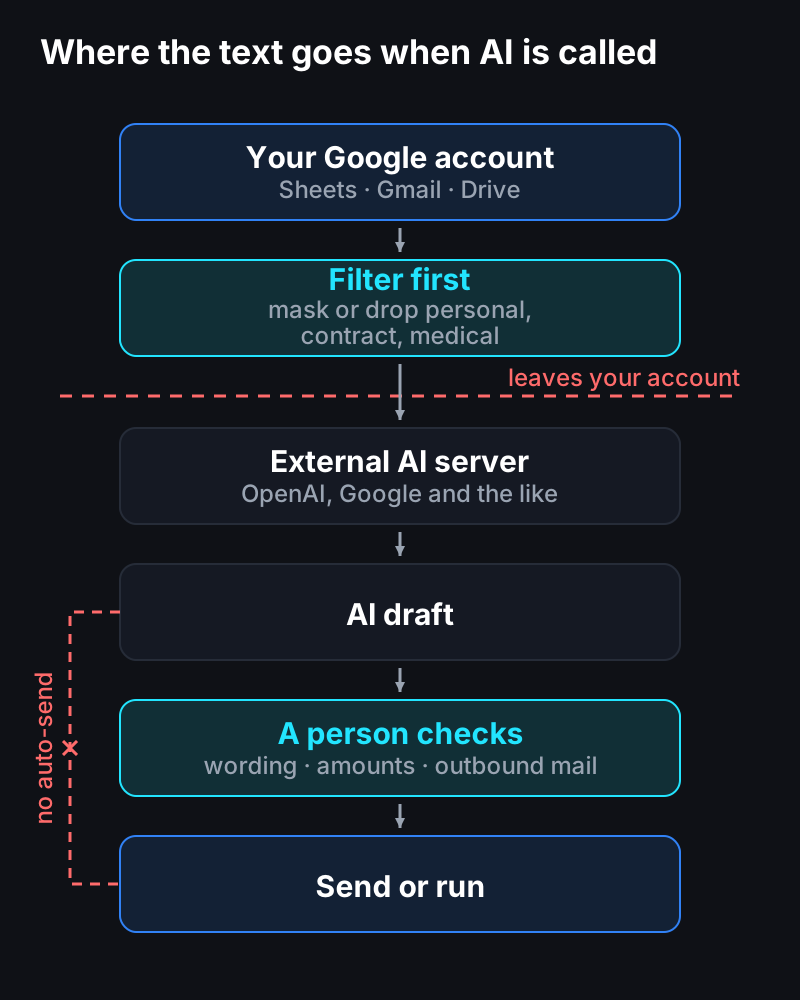
Calling AI sends that text to an outside server (OpenAI, Google, and the like). It’s the first point where data that lived only inside your Google account passes outside it.
Keep the human approval gate
Don’t auto-send or auto-execute AI output without a person checking it. Especially for customer-facing wording, amounts, and outbound email, keep a step where a human looks first. AI drafts fast; judgment and responsibility stay with a person. That one gate prevents the wrong-send accident.
Ideas to try in a small pilot
- Don’t add AI where rules already work. Fixed classification or templates don’t need it.
- Don’t re-call on the same input. Store a result once and reuse it (caching).
- Default to a light model with a call cap. Reserve the top-tier model for the few items that need it.
Before you add it
- Which AI feature — summary, translation, classification, or draft?
- Expected calls per day and length per call?
- Whose key — the customer’s or the builder’s?
- Any sensitive data? Is this content OK to send outside?
With these answers, you can estimate the monthly usage up front.
In one line
Include setup and maintenance as well as any subscriptions, connected services and AI usage. Maybe start with a small measured sample, then agree on limits and who pays each bill before connecting real data.
Questions?
Wondering “what would my AI feature actually cost per month?” — just ask. I’d nudge you to wire it up yourself, but if you’re short on time, I also build these.
Frequently asked questions
- How does adding AI change the upkeep cost?
- AI APIs may add usage charges. Include setup, maintenance, subscriptions and connected services in the estimate, then check current provider rates and measure a small sample before choosing a limit.
- Whose AI API key should be used?
- For production apps, have the customer supply their own AI account key. Usage is billed directly to them, so cost is transparent and the builder never absorbs someone else's bill. Demos run on the builder's key with a call cap.
- Does using AI send data outside Google?
- Yes. Calling AI sends that text to an external server such as OpenAI or Google. Mask or exclude sensitive data like personal, contract, or medical information before sending, and keep a human approval gate on the output.
- 2026.10.20 Export CSV from Google Sheets without losing IDs or breaking notes
- 2026.10.20 Preview Google Sheets imports by ID before adding order rows
- 2026.10.16 Apps Script triggers: 6 traps that make a script run twice, late, or not at all
- 2026.10.16 ARRAYFORMULA in 2 minutes: 5 one-liners and the traps that fill your sheet with zeros
- 2026.10.15 Google Sheets QUERY cheat sheet: 8 strings I reuse, 4 traps that return nothing
- 2026.10.15 Shift Swap: ask from your phone, one tap to approve, the roster fixes itself
- 2026.10.14 XLOOKUP vs VLOOKUP in Google Sheets: the 2-minute version
- 2026.10.14 Tap Ledger: log a coffee in two taps, total it in Sheets
- 2026.10.14 A habit tracker that can leave the app: check-ins to CSV
- 2026.10.13 Your Dashboard Refreshed. Did Its Source Data?
- 2026.07.28 The Awkward Problems in Calendar-Based Attendance Tracking
- 2026.07.26 How One Shared Sheet Link Leaks Company Data
- 2026.07.23 Bad Form Auto-Replies Damage Customer Trust
- 2026.07.13 ChatGPT API Costs Quietly Leak Money If You Do Not Count Them
- 2026.06.20 Cut Your Monthly SaaS Bill: Rent vs Own Your Automation
- 2026.06.19 How Much Does Adding AI Cost? Estimate Usage Before You Build You are here
- 2026.06.19 Automating Your Work with Google Apps Script — The Complete Guide
- 2026.06.16 How a Multi-User Inspection App Is Different
- 2026.06.10 Inventory in Google Sheets: How Far Automation Goes
- 2026.06.08 Apps Script Costs: No Separate Server, but Plan for Upkeep
- 2026.06.06 Outsource vs Build vs SaaS: Compared by Cost