
- 2026.10.20 Export CSV from Google Sheets without losing IDs or breaking notes
- 2026.10.20 Preview Google Sheets imports by ID before adding order rows
- 2026.10.16 Apps Script triggers: 6 traps that make a script run twice, late, or not at all
- 2026.10.16 ARRAYFORMULA in 2 minutes: 5 one-liners and the traps that fill your sheet with zeros
- 2026.10.15 Google Sheets QUERY cheat sheet: 8 strings I reuse, 4 traps that return nothing
- 2026.10.15 Shift Swap: ask from your phone, one tap to approve, the roster fixes itself You are here
- 2026.10.14 XLOOKUP vs VLOOKUP in Google Sheets: the 2-minute version
- 2026.10.14 Tap Ledger: log a coffee in two taps, total it in Sheets
- 2026.10.14 A habit tracker that can leave the app: check-ins to CSV
- 2026.10.13 Your Dashboard Refreshed. Did Its Source Data?
- 2026.07.28 The Awkward Problems in Calendar-Based Attendance Tracking
- 2026.07.26 How One Shared Sheet Link Leaks Company Data
- 2026.07.23 Bad Form Auto-Replies Damage Customer Trust
- 2026.07.13 ChatGPT API Costs Quietly Leak Money If You Do Not Count Them
- 2026.06.20 Cut Your Monthly SaaS Bill: Rent vs Own Your Automation
- 2026.06.19 How Much Does Adding AI Cost? Estimate Usage Before You Build
- 2026.06.19 Automating Your Work with Google Apps Script — The Complete Guide
- 2026.06.16 How a Multi-User Inspection App Is Different
- 2026.06.10 Inventory in Google Sheets: How Far Automation Goes
- 2026.06.08 Apps Script Costs: No Separate Server, but Plan for Upkeep
- 2026.06.06 Outsource vs Build vs SaaS: Compared by Cost
Shift Swap: ask from your phone, one tap to approve, the roster fixes itself
A small mobile web app for shift trades: staff request a swap, the manager approves once, and both shifts move together. Plus how I'd hand it to Google Sheets.

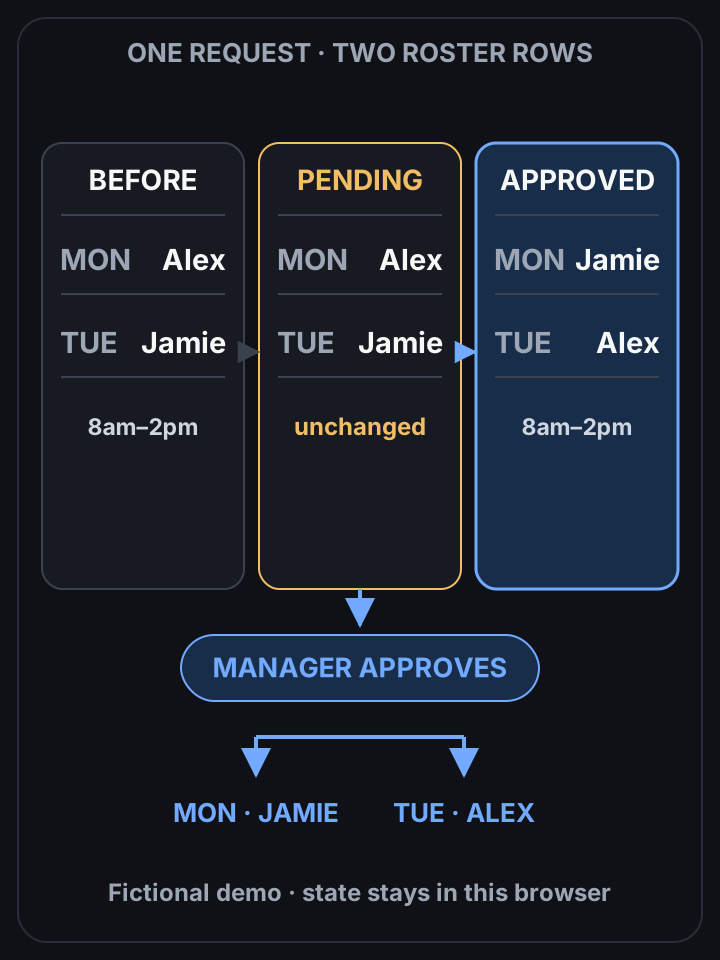
A pending request leaves both shifts unchanged
 View full-size diagram
A shift swap is two changes, not one. Move Alex to Tuesday and forget to move Jamie to Monday, and Monday has nobody. Shift Swap treats the request as a proposal, and approval moves both shifts at once. Try the demo (fictional cafe, no login, nothing leaves your browser).
The usual version of this goes through a group chat. Alex asks, Jamie says “sure” in a DM, the manager updates one cell in the schedule, and three people now have three different rosters.
I built a tiny app for exactly that moment. Everything below is from the live demo.
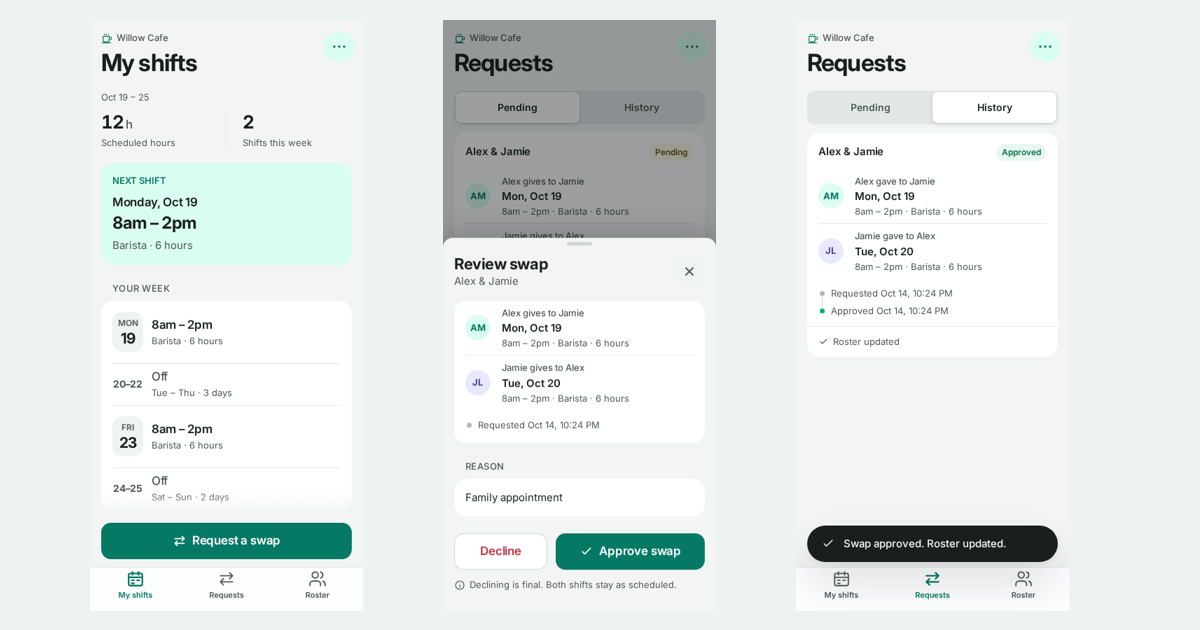
The example
Willow Cafe is made up. So are Alex and Jamie.
| Shift | Before | After approval |
|---|---|---|
| Mon, Oct 19 · 8am–2pm · Barista | Alex Morgan | Jamie Lee |
| Tue, Oct 20 · 8am–2pm · Barista | Jamie Lee | Alex Morgan |
Alex has an appointment on Monday morning. Jamie agreed to trade.
Staff side: four short steps
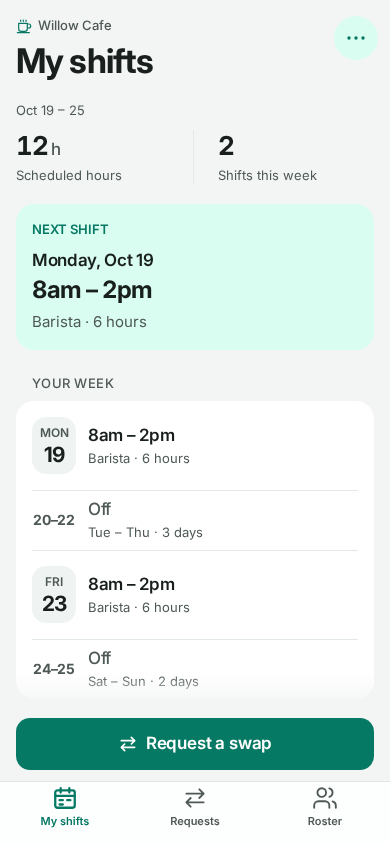
Alex opens My shifts, taps Request a swap, picks the Monday shift, picks Jamie’s Tuesday shift, adds a reason and sends it for review.
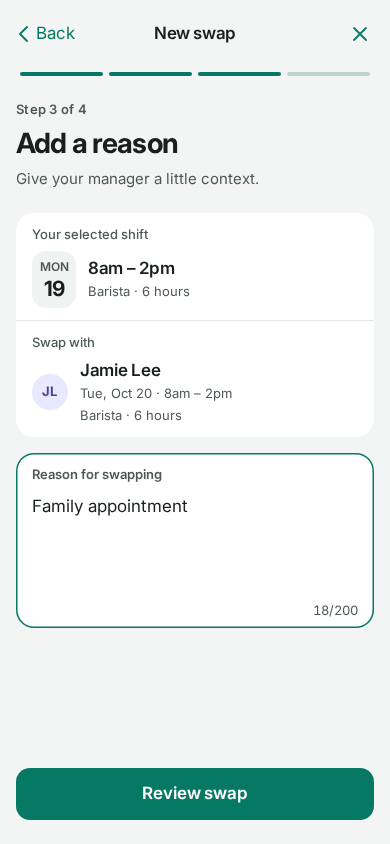
Until the manager decides, the roster doesn’t change. Alex is still on Monday. That’s the whole point: a request is a question, not an edit.
Manager side: one decision
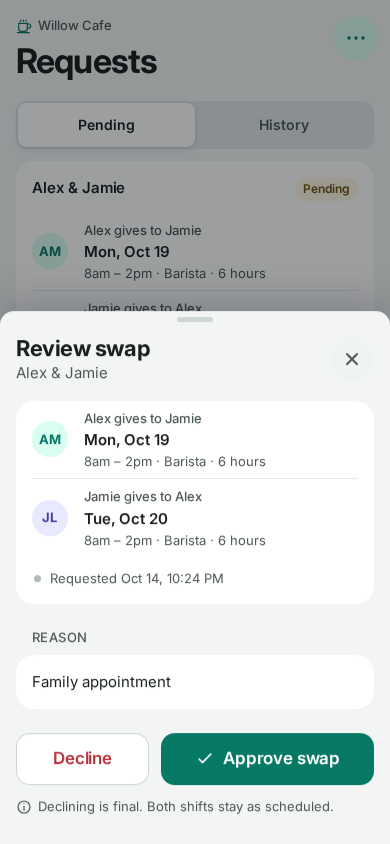
The manager opens Requests, sees both shifts side by side with the reason, and taps Approve swap or Decline. Declining leaves both shifts exactly where they were.
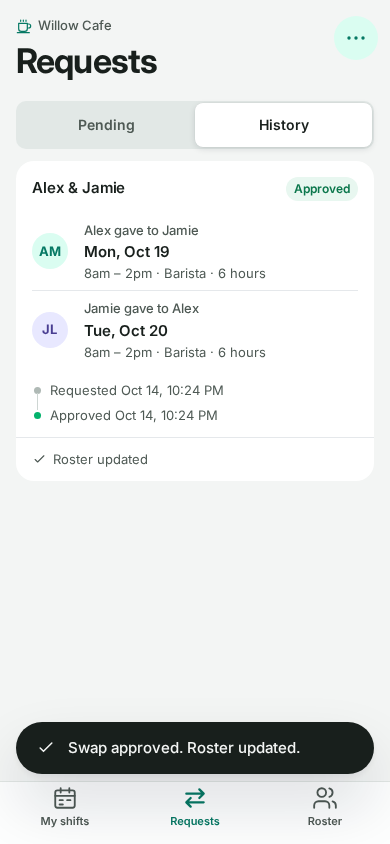
After approval the request moves to History as Approved, and the roster shows Jamie on Monday and Alex on Tuesday.
The part I cared about: no half swaps
Before approving, the app checks a few boring things:
- both shifts still belong to the people in the request (nobody changed them in the meantime)
- the roles match (a barista shift for a barista shift)
- the two people are different, and there isn’t already a pending request for the same two shifts
- the trade doesn’t make anyone work two overlapping shifts
If any of those fail, the old request can’t overwrite the newer roster. Each shift carries a version number for this. In the exported CSV, the two swapped shifts show Version 2, the untouched ones 1.
Date,Start,End,Role,Staff,Version
2026-10-19,08:00,14:00,Barista,Jamie Lee,2
2026-10-20,08:00,14:00,Barista,Alex Morgan,2
2026-10-21,14:00,20:00,Shift lead,Sam Rivera,1
That’s straight from the demo’s roster export after approving the request.
What it does not handle: overtime limits, breaks, qualifications, overnight shifts or local labour rules. A real team would need to tell me their rules first. A green Approve button shouldn’t quietly invent a policy.
Desktop is the same app
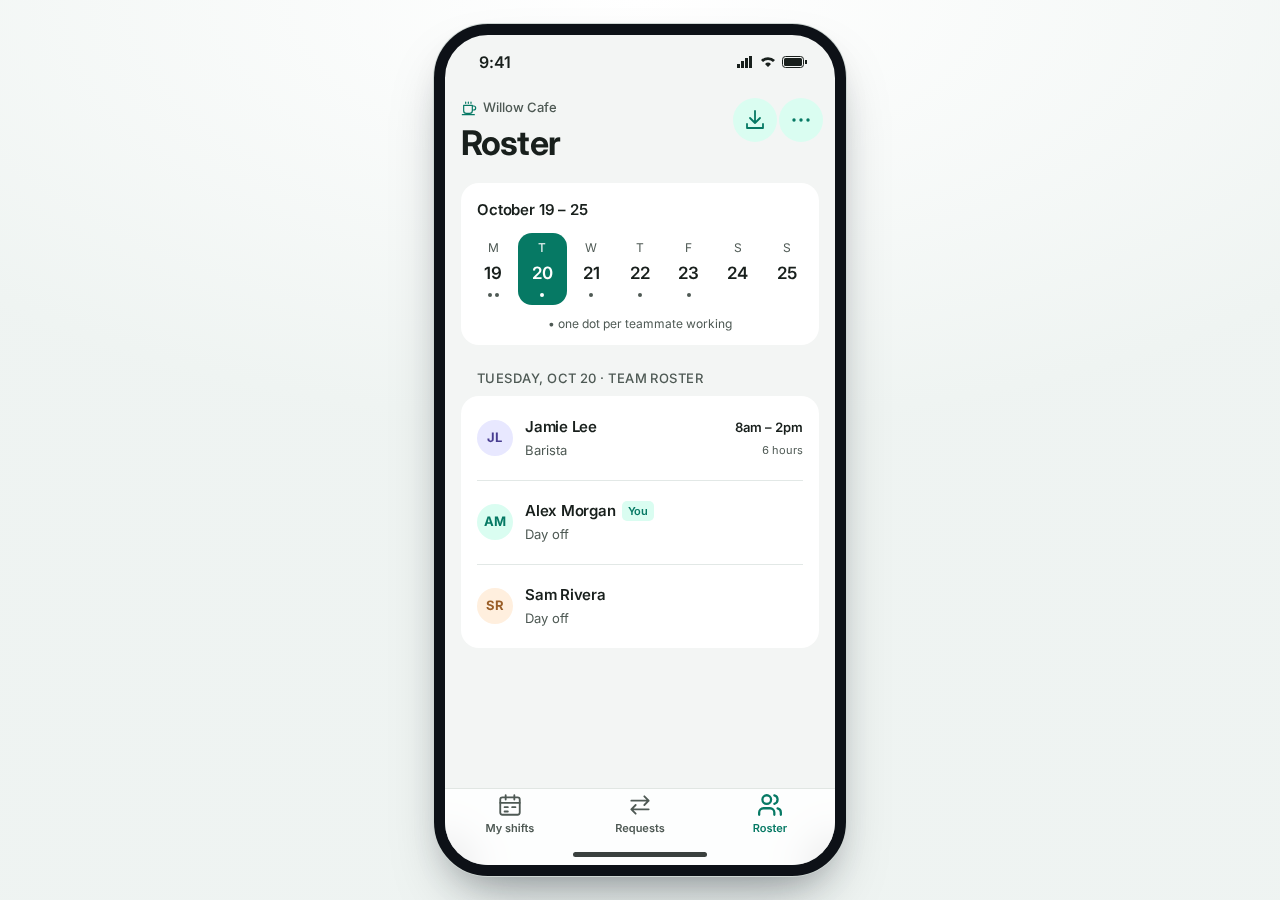
On a laptop it shows the same phone layout in a frame. It’s a phone tool, so I didn’t build a second dashboard.
Where Google Sheets comes in
Right now the public demo keeps its state in your browser only. That’s on purpose: you can play manager without me collecting anyone’s name.
For a real team, the roster would live in a Google Sheet, with a small Apps Script in front of it. The way I set that adapter up:
- The script maps the signed-in Google account to a staff row, and only the configured owner can approve.
- On approve, it takes a script lock and re-reads both rows first.
- It sends both shift changes plus the request status as one Sheets API
batchUpdate, so an error can’t leave half a swap in the sheet.
I’ve tested that adapter against mocked Google services: permissions, lock, stale request, decline and the single update.
It is not connected to a live Sheet in the public demo, and I’m not going to pretend it is. Hooking it to a real roster is a separate step with the owner’s own Google account.
Google’s docs, if you’re building your own:
Try it
Open Shift Swap, request the Monday trade as Alex, then approve it as the manager and download the roster CSV. Use fake reasons, not real staff details.
Your team runs swaps through a group chat and a sheet nobody trusts? Tell me how it works today and I’ll tell you if something this small would fit.
- 2026.10.20 Export CSV from Google Sheets without losing IDs or breaking notes
- 2026.10.20 Preview Google Sheets imports by ID before adding order rows
- 2026.10.16 Apps Script triggers: 6 traps that make a script run twice, late, or not at all
- 2026.10.16 ARRAYFORMULA in 2 minutes: 5 one-liners and the traps that fill your sheet with zeros
- 2026.10.15 Google Sheets QUERY cheat sheet: 8 strings I reuse, 4 traps that return nothing
- 2026.10.15 Shift Swap: ask from your phone, one tap to approve, the roster fixes itself You are here
- 2026.10.14 XLOOKUP vs VLOOKUP in Google Sheets: the 2-minute version
- 2026.10.14 Tap Ledger: log a coffee in two taps, total it in Sheets
- 2026.10.14 A habit tracker that can leave the app: check-ins to CSV
- 2026.10.13 Your Dashboard Refreshed. Did Its Source Data?
- 2026.07.28 The Awkward Problems in Calendar-Based Attendance Tracking
- 2026.07.26 How One Shared Sheet Link Leaks Company Data
- 2026.07.23 Bad Form Auto-Replies Damage Customer Trust
- 2026.07.13 ChatGPT API Costs Quietly Leak Money If You Do Not Count Them
- 2026.06.20 Cut Your Monthly SaaS Bill: Rent vs Own Your Automation
- 2026.06.19 How Much Does Adding AI Cost? Estimate Usage Before You Build
- 2026.06.19 Automating Your Work with Google Apps Script — The Complete Guide
- 2026.06.16 How a Multi-User Inspection App Is Different
- 2026.06.10 Inventory in Google Sheets: How Far Automation Goes
- 2026.06.08 Apps Script Costs: No Separate Server, but Plan for Upkeep
- 2026.06.06 Outsource vs Build vs SaaS: Compared by Cost