
- 2026.10.20 Export CSV from Google Sheets without losing IDs or breaking notes
- 2026.10.20 Preview Google Sheets imports by ID before adding order rows
- 2026.10.16 Apps Script triggers: 6 traps that make a script run twice, late, or not at all
- 2026.10.16 ARRAYFORMULA in 2 minutes: 5 one-liners and the traps that fill your sheet with zeros You are here
- 2026.10.15 Google Sheets QUERY cheat sheet: 8 strings I reuse, 4 traps that return nothing
- 2026.10.15 Shift Swap: ask from your phone, one tap to approve, the roster fixes itself
- 2026.10.14 XLOOKUP vs VLOOKUP in Google Sheets: the 2-minute version
- 2026.10.14 Tap Ledger: log a coffee in two taps, total it in Sheets
- 2026.10.14 A habit tracker that can leave the app: check-ins to CSV
- 2026.10.13 Your Dashboard Refreshed. Did Its Source Data?
- 2026.07.28 The Awkward Problems in Calendar-Based Attendance Tracking
- 2026.07.26 How One Shared Sheet Link Leaks Company Data
- 2026.07.23 Bad Form Auto-Replies Damage Customer Trust
- 2026.07.13 ChatGPT API Costs Quietly Leak Money If You Do Not Count Them
- 2026.06.20 Cut Your Monthly SaaS Bill: Rent vs Own Your Automation
- 2026.06.19 How Much Does Adding AI Cost? Estimate Usage Before You Build
- 2026.06.19 Automating Your Work with Google Apps Script — The Complete Guide
- 2026.06.16 How a Multi-User Inspection App Is Different
- 2026.06.10 Inventory in Google Sheets: How Far Automation Goes
- 2026.06.08 Apps Script Costs: No Separate Server, but Plan for Upkeep
- 2026.06.06 Outsource vs Build vs SaaS: Compared by Cost
ARRAYFORMULA in 2 minutes: 5 one-liners and the traps that fill your sheet with zeros
One formula in row 2 that fills the whole column: totals, labels, auto IDs, buckets and checks. Every formula ran in a real Google Sheet, including the ones that go wrong.

One array formula feeds row totals and leaves empty rows blank
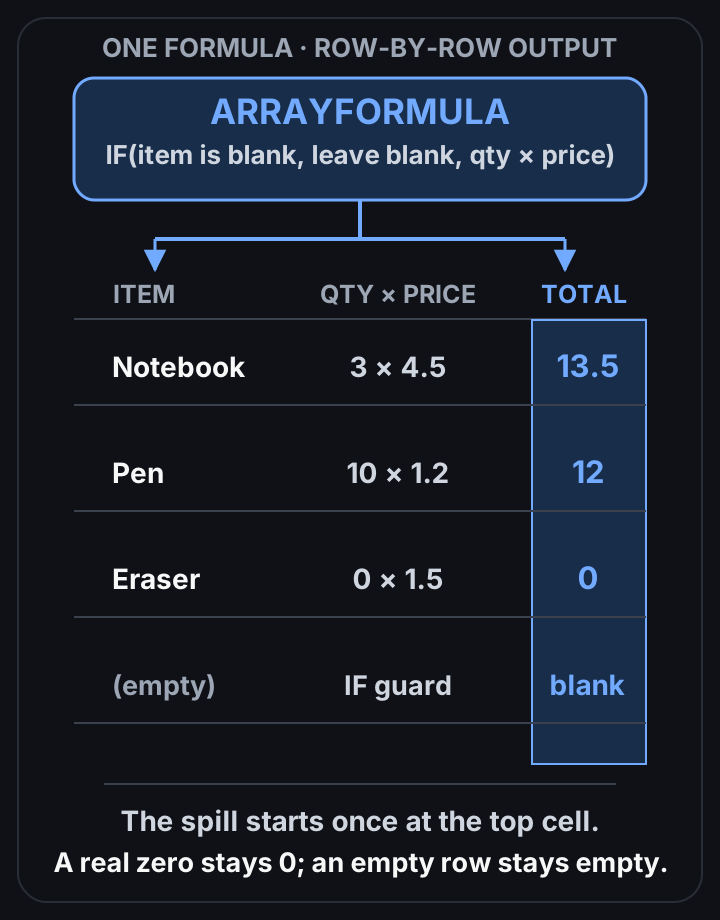 View full-size diagram
Write one formula in row 2, wrap it in ARRAYFORMULA, and it fills the whole column. No more dragging formulas down, no more new rows with a missing formula. Wrap the math in IF(A2:A11="",,…) or your empty rows turn into zeros.
I ran every formula below in a scratch Google Sheet on 2026-10-16. The results are what Sheets returned.
The test data
A small item list. Row 1 is headers, rows 2 to 7 have data, rows 8 to 11 are empty on purpose.
| Row | A: Item | B: Qty | C: Price |
|---|---|---|---|
| 2 | Notebook | 3 | 4.5 |
| 3 | Pen | 10 | 1.2 |
| 4 | Stapler | 1 | 9.9 |
| 5 | Eraser | 0 | 1.5 |
| 6 | Desk lamp | 1 | 27.5 |
| 7 | Marker set | 2 | 7.25 |
I used fixed ranges like B2:B11 so you can see exactly where the column ends. In your own sheet, size the range to where your data can grow.
Five one-liners
Each one goes in a single cell. The rest of the column fills itself.
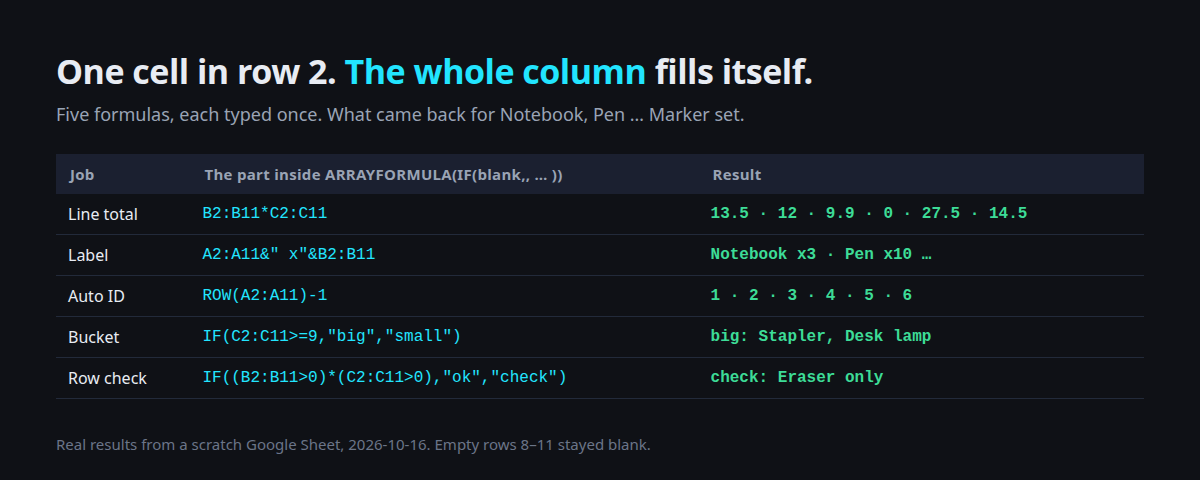
| Job | Formula (in row 2) | What I got |
|---|---|---|
| Line total | =ARRAYFORMULA(IF(B2:B11="",,B2:B11*C2:C11)) | 13.5, 12, 9.9, 0, 27.5, 14.5, then blanks |
| Label | =ARRAYFORMULA(IF(A2:A11="",,A2:A11&" x"&B2:B11)) | Notebook x3, Pen x10 … Marker set x2 |
| Auto ID | =ARRAYFORMULA(IF(A2:A11="",,ROW(A2:A11)-1)) | 1, 2, 3, 4, 5, 6 |
| Bucket | =ARRAYFORMULA(IF(A2:A11="",,IF(C2:C11>=9,"big","small"))) | big for Stapler and Desk lamp, small for the rest |
| Row check | =ARRAYFORMULA(IF(A2:A11="",,IF((B2:B11>0)*(C2:C11>0),"ok","check"))) | ok five times, check for Eraser |
The IF(A2:A11="",,…) part is the habit that matters. Two commas in a row means “leave it blank”.
So rows with no item stay empty instead of showing junk.
The Auto ID one is handy for a quick row number. It’s the row position though, so it changes if you sort or delete rows.
For an ID that has to stick (an order number, a student ID), type it in or let a script write it once.
Header and formula in the same cell
This one goes in row 1, not row 2:
={"Total";ARRAYFORMULA(IF(B2:B11="",,B2:B11*C2:C11))}The { ; } stacks the header on top of the results. I got Total in row 1 and the same totals below. Nice when people sort or filter the sheet, because nobody accidentally types over a formula sitting in row 2.
Trap 1: empty rows become zeros
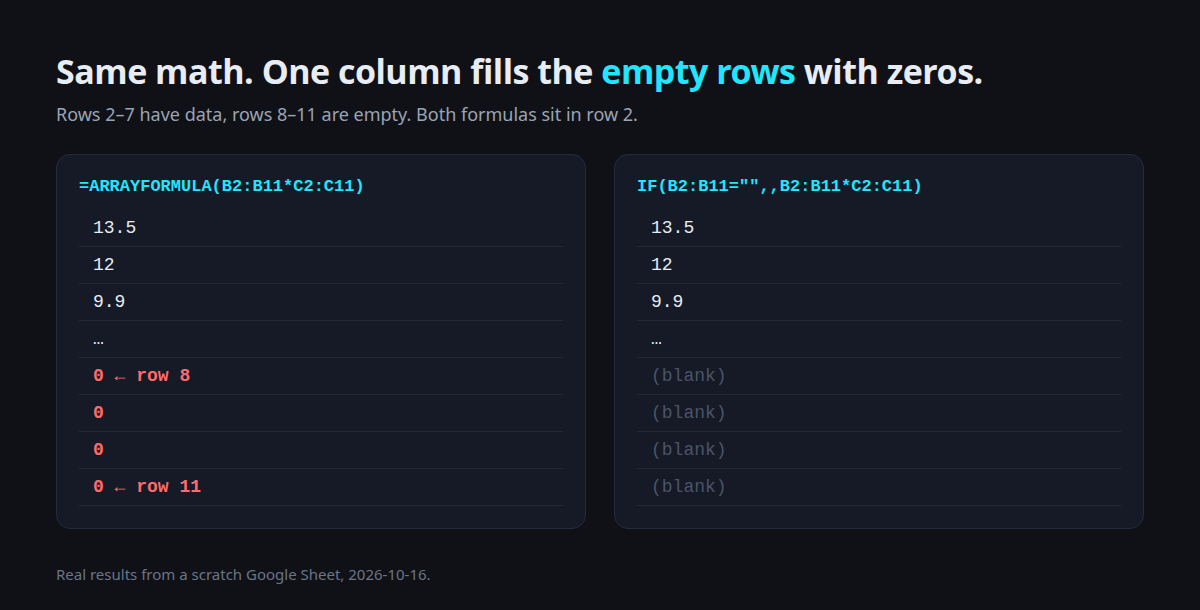
=ARRAYFORMULA(B2:B11*C2:C11) gave the right totals for rows 2 to 7, then 0, 0, 0, 0 for the empty rows. Empty times empty is zero, as far as Sheets is concerned.
It looks harmless until someone counts rows with COUNT, or a chart drops to zero at the end.
Wrap it in IF(B2:B11="",,…) and those rows stay blank.
Trap 2: SUM and AND eat the whole column
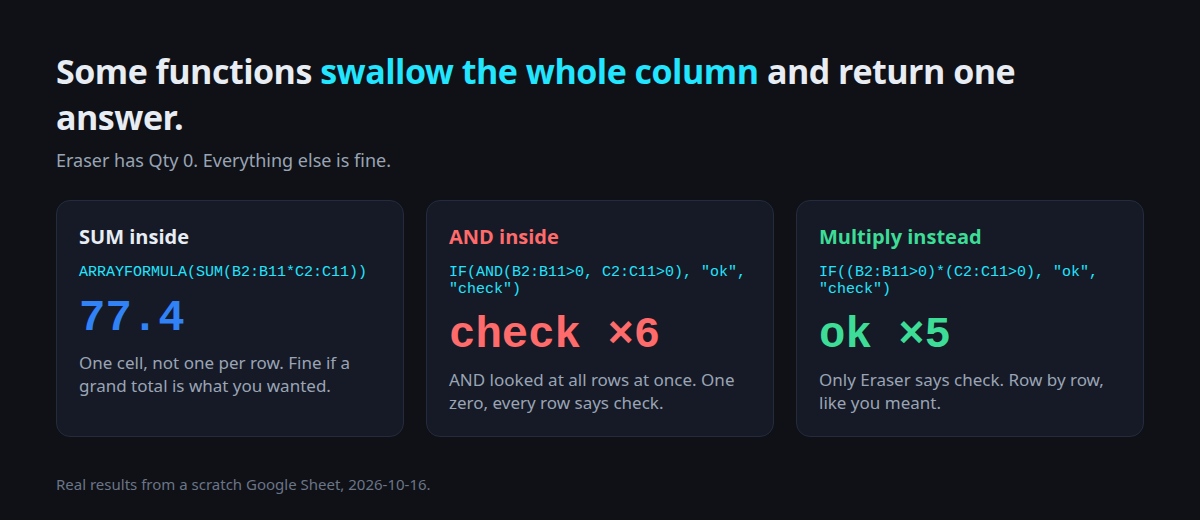
Some functions take a whole range and return one value. Inside ARRAYFORMULA they still do.
=ARRAYFORMULA(SUM(B2:B11*C2:C11))returned 77.4 in one cell. That’s the grand total, not a total per row.IF(AND(B2:B11>0, C2:C11>0), "ok", "check")returned check on all six rows. AND looked at every row at once, saw Eraser’s 0, and said false for everyone.
The fix for AND: multiply the conditions. (B2:B11>0)*(C2:C11>0) is 1 only when both are true, row by row. For OR, add them. I tested IF((B2:B5>5)+(C2:C5>9),"flag","-") on the first four rows and got flag only for Pen (Qty 10) and Stapler (Price 9.9).
Trap 3: something is in the way
I typed an x into L4, then put =ARRAYFORMULA(IF(A2:A11="",,B2:B11+1)) in L2.
L2 showed #REF!. The formula wanted to fill L2 to L11, hit my x, and refused to overwrite it. Delete that one value and the column fills again.
This is the most common way an ARRAYFORMULA column “breaks” in a shared sheet: someone types a note into the middle of it.
Copy-paste summary
| You want | Write |
|---|---|
| Row-by-row math, blanks stay blank | =ARRAYFORMULA(IF(B2:B11="",,B2:B11*C2:C11)) |
| Header in the formula cell | ={"Total";ARRAYFORMULA(…)} in row 1 |
| AND per row | (cond1)*(cond2) |
| OR per row | (cond1)+(cond2) |
| Grand total | plain SUM(…), no ARRAYFORMULA needed |
Column shows #REF! | find the typed value inside the output range |
If a column of formulas keeps breaking because people type into it, that’s usually the moment to protect the range or move the calculation into a small script.
If you need SQL-ish filtering on top of this, the QUERY cheat sheet is the next step.
Got a sheet where formulas keep disappearing or filling with zeros? Send me what it does, and I’ll tell you whether it’s a formula fix or time for a small script.
- 2026.10.20 Export CSV from Google Sheets without losing IDs or breaking notes
- 2026.10.20 Preview Google Sheets imports by ID before adding order rows
- 2026.10.16 Apps Script triggers: 6 traps that make a script run twice, late, or not at all
- 2026.10.16 ARRAYFORMULA in 2 minutes: 5 one-liners and the traps that fill your sheet with zeros You are here
- 2026.10.15 Google Sheets QUERY cheat sheet: 8 strings I reuse, 4 traps that return nothing
- 2026.10.15 Shift Swap: ask from your phone, one tap to approve, the roster fixes itself
- 2026.10.14 XLOOKUP vs VLOOKUP in Google Sheets: the 2-minute version
- 2026.10.14 Tap Ledger: log a coffee in two taps, total it in Sheets
- 2026.10.14 A habit tracker that can leave the app: check-ins to CSV
- 2026.10.13 Your Dashboard Refreshed. Did Its Source Data?
- 2026.07.28 The Awkward Problems in Calendar-Based Attendance Tracking
- 2026.07.26 How One Shared Sheet Link Leaks Company Data
- 2026.07.23 Bad Form Auto-Replies Damage Customer Trust
- 2026.07.13 ChatGPT API Costs Quietly Leak Money If You Do Not Count Them
- 2026.06.20 Cut Your Monthly SaaS Bill: Rent vs Own Your Automation
- 2026.06.19 How Much Does Adding AI Cost? Estimate Usage Before You Build
- 2026.06.19 Automating Your Work with Google Apps Script — The Complete Guide
- 2026.06.16 How a Multi-User Inspection App Is Different
- 2026.06.10 Inventory in Google Sheets: How Far Automation Goes
- 2026.06.08 Apps Script Costs: No Separate Server, but Plan for Upkeep
- 2026.06.06 Outsource vs Build vs SaaS: Compared by Cost