
- 2026.11.08 Job site daily report app: capture work before the drive home
- 2026.11.08 Multi-location inventory spreadsheet: stop missing transfers
- 2026.11.06 Reconcile marketplace payouts with your orders in Google Sheets
- 2026.11.01 What to automate first in a small business office: pick one task
- 2026.10.31 Hiring someone to automate a spreadsheet: 5 questions before you sign
- 2026.10.29 Same order submitted twice at once? Stop duplicate rows in Sheets
- 2026.10.24 Slow Google Sheets script on order intake? Read once, write once
- 2026.10.20 Google Sheets CSV export drops leading zeros: keep IDs intact
- 2026.10.20 Importing orders into Google Sheets without duplicate rows
- 2026.10.16 Google Sheets automation sent the email twice? 6 trigger traps
- 2026.10.16 Stop dragging formulas down in Google Sheets (ARRAYFORMULA)
- 2026.10.15 Filter, total and sort a Google Sheet with one formula (QUERY)
- 2026.10.15 Shift swaps from a phone: one approval, and the roster updates
- 2026.10.14 Google Sheets lookup shows the wrong value: VLOOKUP vs XLOOKUP
- 2026.10.14 Expense app that logs a coffee in two taps and totals in Sheets
- 2026.10.14 Daily check-in app with CSV export you can total in Google Sheets
- 2026.10.13 Stale data on your dashboard: when 'updated' doesn't mean fresh
- 2026.07.28 Tracking staff attendance in Google Calendar: where records break
- 2026.07.26 Google Sheet shared by link: how company data quietly leaks
- 2026.07.23 Form auto-reply emails that annoy customers, and how to fix them
- 2026.07.13 ChatGPT API bill higher than expected? Where the cost leaks
- 2026.06.20 Monthly SaaS bill for a simple workflow: rent it or own a tool? You are here
- 2026.06.19 Adding AI to a work app: what it costs each month, and who pays
- 2026.06.19 Automate repetitive office work in Google Sheets with Apps Script
- 2026.06.16 Field inspection app for a small team: paper checklist to phone
- 2026.06.10 Inventory tracking in Google Sheets for one store: where it stops
- 2026.06.08 Is Google Sheets automation free? No server bill, but plan upkeep
- 2026.06.06 Outsource, DIY or SaaS for one workflow: which costs less?
Monthly SaaS bill for a simple workflow: rent it or own a tool?
Paying a monthly SaaS bill for a simple workflow? A custom Apps Script tool may replace it, but setup and upkeep count too. Compare total cost over the time you'll use it.

Provider-run subscription versus an account-owned workflow
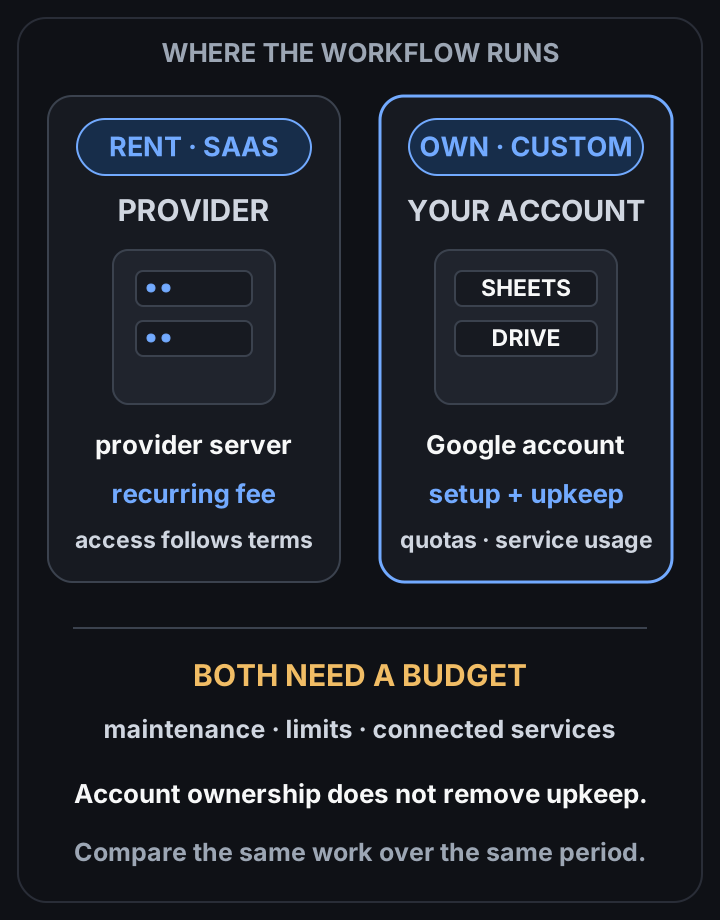 View full-size diagram
The team pays every month for a tool that mostly moves form entries into a sheet and sends a reminder. Someone asks whether a small custom tool would be cheaper.
The answer: a custom tool may replace the subscription, but it still needs setup and upkeep. Compare the build quote, maintenance, account plans and connected services with the subscription over the period you expect to use it. For what owning looks like in practice, see work automation.
Why it matters
Subscription fees can grow with seats and tiers. A custom workflow has a different cost structure: include build work, fixes and changes as well as any services it still depends on.
Definition: ‘rent’ vs ‘own’
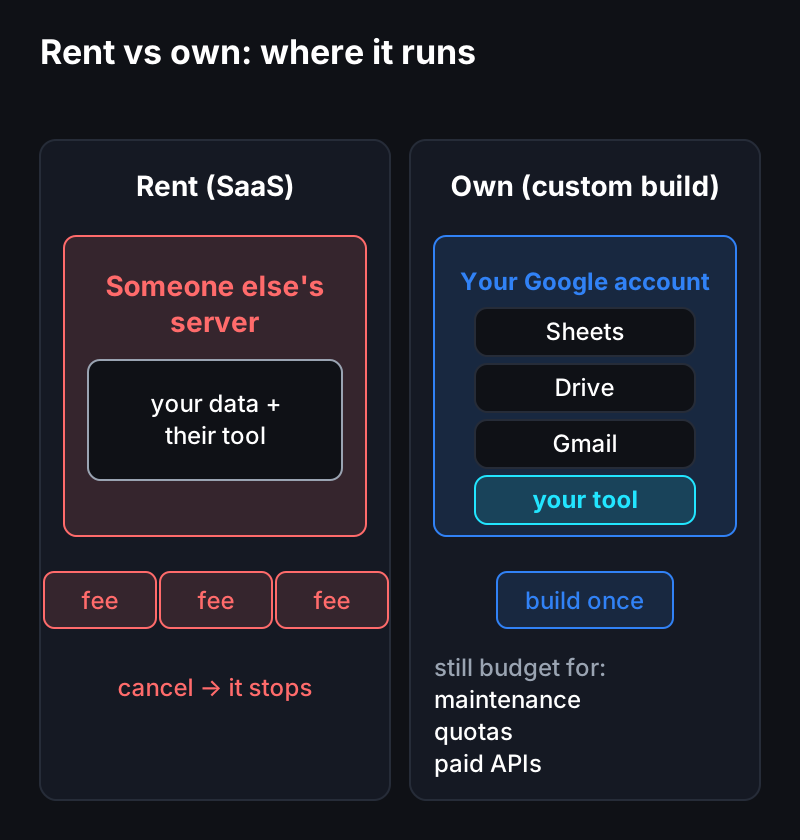
- Rent (SaaS subscription): you pay monthly to rent a standard tool running on someone else’s server. Cancel and it stops.
- Own (custom build): you build a small tool once that runs on your own Google account (Sheets, Drive, Gmail). No server to rent means no hosting fixed cost.
Rent vs Own
| Aspect | Rent (SaaS) | Own (custom build) |
|---|---|---|
| Cost structure | Subscription under the provider terms | Setup + maintenance + any account/API charges |
| Where it runs | Someone else’s server | Inside your Google account |
| Customization | Only within what’s offered | Tailored to your workflow |
| Shutdown risk | Tied to cancellation/price hikes | You own it |
| Best for | Standard work, fast start | Small/repetitive work, long-term use |
The full three-way cost comparison including outsourcing is covered in Outsource vs Build vs SaaS: Compared by Cost.
Framework: the 3 rules of automation cost
- Separate hosting is only one cost. Include setup, maintenance and account subscriptions too.
- Check current account quotas. Hitting a limit can stop a workflow; paying for a plan does not remove every limit. (Costs and limits)
- Check connected service costs. For an AI API, maybe start with a small measured sample and a spending limit. (Estimating AI usage)
Would owning be cheaper for me? (30-second check)
These questions can help scope a comparison; they do not establish that a custom build is cheaper.
- It draws a fixed amount every month.
- The core features are sheet/form/email level.
- Headcount and volume aren’t explosive.
- The SaaS “almost but doesn’t quite” fit your work.
Caution (exceptions)
- It’s not “100% always free.” Bulk sends, enterprise features, and paid external APIs add cost — price them in first.
- Safety-critical or very-large-scale, real-time multi-site work belongs on a dedicated backend from the start. (How far a Google Sheet scales)
5-line summary
- SaaS = a fixed cost you rent monthly; a custom build = owned once.
- Running inside a Google account may avoid separate hosting charges; upkeep still needs a budget.
- It’s not “always free” — quota, AI, and bulk are exceptions.
- Compare the same period of use and include maintenance and changes in both estimates.
- Which of the three is cheapest depends on duration, frequency, and fit.
Questions?
Wondering “would building my own be cheaper?” — just ask. I’d nudge you to try it yourself first, but if you’re short on time, I also build these. New here? Start with the complete guide.
Frequently asked questions
- Is a self-built automation really $0 every month?
- A workflow may avoid separate server hosting charges, but setup, maintenance, account subscriptions and connected services can still cost money. Check current quotas and measure a small pilot.
- When is switching from SaaS to a custom build worth it?
- Compare the subscription with a written build and maintenance quote for the same scope and period. A small pilot may help check the fit and usage assumptions before switching.
- How is this different from outsourcing/commissioning?
- Commissioning is one way to obtain a custom tool. Agree on ownership, access, maintenance and recurring services in writing; running inside a Google account does not establish the full cost.
- 2026.11.08 Job site daily report app: capture work before the drive home
- 2026.11.08 Multi-location inventory spreadsheet: stop missing transfers
- 2026.11.06 Reconcile marketplace payouts with your orders in Google Sheets
- 2026.11.01 What to automate first in a small business office: pick one task
- 2026.10.31 Hiring someone to automate a spreadsheet: 5 questions before you sign
- 2026.10.29 Same order submitted twice at once? Stop duplicate rows in Sheets
- 2026.10.24 Slow Google Sheets script on order intake? Read once, write once
- 2026.10.20 Google Sheets CSV export drops leading zeros: keep IDs intact
- 2026.10.20 Importing orders into Google Sheets without duplicate rows
- 2026.10.16 Google Sheets automation sent the email twice? 6 trigger traps
- 2026.10.16 Stop dragging formulas down in Google Sheets (ARRAYFORMULA)
- 2026.10.15 Filter, total and sort a Google Sheet with one formula (QUERY)
- 2026.10.15 Shift swaps from a phone: one approval, and the roster updates
- 2026.10.14 Google Sheets lookup shows the wrong value: VLOOKUP vs XLOOKUP
- 2026.10.14 Expense app that logs a coffee in two taps and totals in Sheets
- 2026.10.14 Daily check-in app with CSV export you can total in Google Sheets
- 2026.10.13 Stale data on your dashboard: when 'updated' doesn't mean fresh
- 2026.07.28 Tracking staff attendance in Google Calendar: where records break
- 2026.07.26 Google Sheet shared by link: how company data quietly leaks
- 2026.07.23 Form auto-reply emails that annoy customers, and how to fix them
- 2026.07.13 ChatGPT API bill higher than expected? Where the cost leaks
- 2026.06.20 Monthly SaaS bill for a simple workflow: rent it or own a tool? You are here
- 2026.06.19 Adding AI to a work app: what it costs each month, and who pays
- 2026.06.19 Automate repetitive office work in Google Sheets with Apps Script
- 2026.06.16 Field inspection app for a small team: paper checklist to phone
- 2026.06.10 Inventory tracking in Google Sheets for one store: where it stops
- 2026.06.08 Is Google Sheets automation free? No server bill, but plan upkeep
- 2026.06.06 Outsource, DIY or SaaS for one workflow: which costs less?