
- 2026.11.08 Job site daily report app: capture work before the drive home
- 2026.11.08 Multi-location inventory spreadsheet: stop missing transfers
- 2026.11.06 Reconcile marketplace payouts with your orders in Google Sheets
- 2026.11.01 What to automate first in a small business office: pick one task
- 2026.10.31 Hiring someone to automate a spreadsheet: 5 questions before you sign
- 2026.10.29 Same order submitted twice at once? Stop duplicate rows in Sheets You are here
- 2026.10.24 Slow Google Sheets script on order intake? Read once, write once
- 2026.10.20 Google Sheets CSV export drops leading zeros: keep IDs intact
- 2026.10.20 Importing orders into Google Sheets without duplicate rows
- 2026.10.16 Google Sheets automation sent the email twice? 6 trigger traps
- 2026.10.16 Stop dragging formulas down in Google Sheets (ARRAYFORMULA)
- 2026.10.15 Filter, total and sort a Google Sheet with one formula (QUERY)
- 2026.10.15 Shift swaps from a phone: one approval, and the roster updates
- 2026.10.14 Google Sheets lookup shows the wrong value: VLOOKUP vs XLOOKUP
- 2026.10.14 Expense app that logs a coffee in two taps and totals in Sheets
- 2026.10.14 Daily check-in app with CSV export you can total in Google Sheets
- 2026.10.13 Stale data on your dashboard: when 'updated' doesn't mean fresh
- 2026.07.28 Tracking staff attendance in Google Calendar: where records break
- 2026.07.26 Google Sheet shared by link: how company data quietly leaks
- 2026.07.23 Form auto-reply emails that annoy customers, and how to fix them
- 2026.07.13 ChatGPT API bill higher than expected? Where the cost leaks
- 2026.06.20 Monthly SaaS bill for a simple workflow: rent it or own a tool?
- 2026.06.19 Adding AI to a work app: what it costs each month, and who pays
- 2026.06.19 Automate repetitive office work in Google Sheets with Apps Script
- 2026.06.16 Field inspection app for a small team: paper checklist to phone
- 2026.06.10 Inventory tracking in Google Sheets for one store: where it stops
- 2026.06.08 Is Google Sheets automation free? No server bill, but plan upkeep
- 2026.06.06 Outsource, DIY or SaaS for one workflow: which costs less?
Same order submitted twice at once? Stop duplicate rows in Sheets
When two people submit the same order at the same moment, a shared Google Sheet can end up with two rows. A script lock (LockService) and a recheck of the ID column keep it to one.

Two people press submit for order 00125 at almost the same moment. Both see it saved, and the shared Orders sheet now has two rows for one order, even though each line of code looks correct.
The fix is a script lock plus a reread: the second request waits for the first, checks the ID column again, finds 00125 and stops, so the sheet keeps one row. Without the lock, both executions read the ID column, both see no match, and both append. For shared order sheets and phone forms built this way, see work automation.
| Time | Request A | Request B | Orders column A |
|---|---|---|---|
| 1 | Reads IDs; no 00125 | Header only | |
| 2 | Reads IDs; no 00125 | Header only | |
| 3 | Appends 00125 | 00125 | |
| 4 | Appends 00125 | 00125, 00125 |
A script lock changes the order. Google’s LockService.getScriptLock() serializes guarded code sections across users of the same script. The lock is acquired only by tryLock() or waitLock(). Here, the second request waits for the first to finish, then rereads the ID column while holding the lock. It sees 00125 and returns duplicate without writing a second row.
The ID column must store stable IDs as text. A cell already coerced to a number may have lost leading zeroes: 00125 can become 125, and the exact text comparison in this example cannot recover the original value. Repair the column before relying on this check.
The flow: one lock, one reread, one decision
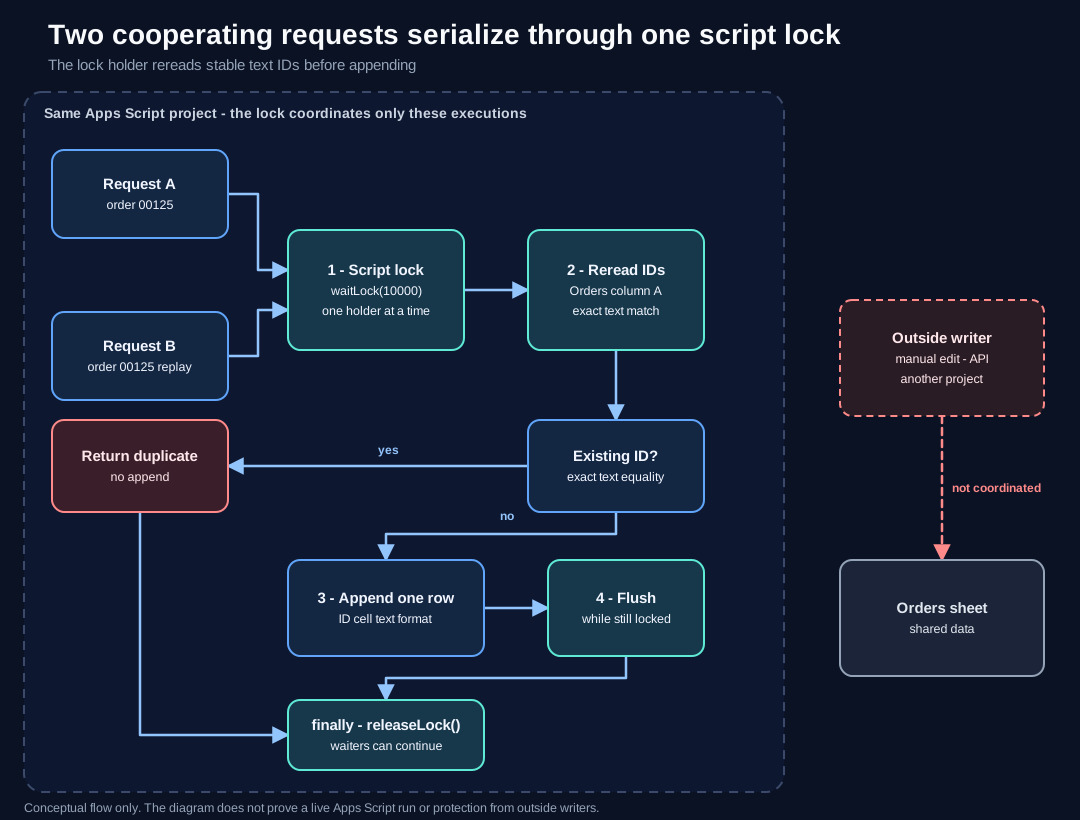
Two cooperating requests serialize through one script lock. The lock holder rereads the stable text IDs, so the replay returns duplicate without a second row; the first request appends, flushes, and releases in finally. A manual edit, API client, or another project writes beyond this lock boundary and is not coordinated. View the full-size diagram.
Complete Apps Script example
Paste this code into a spreadsheet-bound Apps Script project. The downloadable .gs file contains exactly this code.
function recordOrder(orderId, item, quantity) {
  if (typeof orderId !== "string" || !/^\d+$/.test(orderId)) {
    throw new Error("orderId must be a digit-only text ID");
  }
  if (typeof item !== "string" || item.trim() === "") {
    throw new Error("item must be a non-empty string");
  }
  if (typeof quantity !== "number" || !Number.isSafeInteger(quantity) || quantity < 1) {
    throw new Error("quantity must be a positive safe integer");
  }

  const lock = LockService.getScriptLock();
  lock.waitLock(10000);

  try {
    const sheet = SpreadsheetApp.getActiveSpreadsheet().getSheetByName("Orders");
    if (!sheet) {
      throw new Error('Missing sheet: "Orders"');
    }

    const lastRow = sheet.getLastRow();
    const existingIds = lastRow < 2
      ? []
      : sheet.getRange(2, 1, lastRow - 1, 1).getValues().map((row) => row[0]);

    if (existingIds.some((value) => value === orderId)) {
      return "duplicate";
    }

    const nextRow = Math.max(lastRow + 1, 2);
    sheet.getRange(nextRow, 1).setNumberFormat("@");
    sheet.getRange(nextRow, 1, 1, 3).setValues([[orderId, item, quantity]]);
    SpreadsheetApp.flush();
    return "saved";
  } finally {
    lock.releaseLock();
  }
}
The example assumes an Orders tab with headers in row 1 and data starting in row 2. It does not create the tab, repair numeric IDs, send email, or call an external service.
What each guard protects
| Guard | Where it runs | What it prevents |
|---|---|---|
| Input validation | Before getScriptLock() | Invalid ID, item, or quantity takes no lock and writes nothing |
waitLock(10000) | Before the reread | A cooperating execution cannot read the ID column while another holds the lock |
| Reread of column A | Inside the lock | Acting on a stale read from before the lock |
| Exact text comparison | Inside the lock | Appending a row for an ID that already exists as the same text |
setNumberFormat("@") | Before setValues() | Sheets storing the new ID as a number |
SpreadsheetApp.flush() | Before releaseLock() | Releasing the lock while the spreadsheet write is still pending |
finally release | On success, duplicate, or error | Leaving the lock held after an exception |
waitLock(timeoutInMillis) throws if it cannot acquire the lock before the timeout. releaseLock() frees waiting executions. Google recommends calling SpreadsheetApp.flush() before releasing the lock when the guarded code uses Sheets. SpreadsheetApp.flush() applies pending spreadsheet changes.
What the lock does not cover
The lock coordinates only cooperating executions of that Apps Script project. A person editing the sheet, an API client, or another Apps Script project does not take this lock. Those writers can still append a duplicate or change the ID column while the lock is held.
A stable key handles repeated IDs only when every writer uses the same path. If one path writes 00125 as text and another writes 125 as a number, the exact comparison treats them as different values. A lock is not a transaction and does not guarantee exactly-once external side effects. With this function, a retry after the row is saved returns duplicate; the caller must track a later email or API call separately and decide whether to retry it.
Local Node harness with stubs
Save the downloaded file as lockservice-concurrency-example.gs and the harness below as verify-lockservice.cjs in the same folder. Run node verify-lockservice.cjs.
This is a local stub test, not a live Apps Script service test. It replaces LockService, SpreadsheetApp, and the sheet with fake objects. It checks the save, the duplicate skip, invalid input before the lock, lock-before-reread, flush-before-release, and release after an error. It does not prove how Google schedules executions or how a real sheet behaves.
const fs = require("node:fs");
const vm = require("node:vm");
const assert = require("node:assert/strict");

const code = fs.readFileSync("lockservice-concurrency-example.gs", "utf8");
const events = [];
const rows = [["Order ID", "Item", "Quantity"], ["00124", "Candle", 1]];
let failNextWrite = false;

const sheet = {
  getLastRow: () => rows.length,
  getRange(row, column, numRows = 1, numColumns = 1) {
    return {
      getValues: () => {
        events.push("read");
        return rows.slice(row - 1, row - 1 + numRows)
          .map((r) => r.slice(column - 1, column - 1 + numColumns));
      },
      setNumberFormat: () => events.push("format"),
      setValues: (values) => {
        if (failNextWrite) throw new Error("write failed");
        events.push("write");
        values.forEach((value, index) => { rows[row - 1 + index] = value; });
      },
    };
  },
};

const sandbox = {
  console,
  LockService: {
    getScriptLock: () => ({
      waitLock: () => events.push("lock"),
      releaseLock: () => events.push("release"),
    }),
  },
  SpreadsheetApp: {
    getActiveSpreadsheet: () => ({ getSheetByName: () => sheet }),
    flush: () => events.push("flush"),
  },
};
vm.runInNewContext(code, sandbox);

assert.equal(sandbox.recordOrder("00125", "Blue mug", 2), "saved");
assert.equal(JSON.stringify(rows.at(-1)), JSON.stringify(["00125", "Blue mug", 2]));
assert.equal(sandbox.recordOrder("00125", "Blue mug", 2), "duplicate");
assert.equal(rows.length, 3);
assert.ok(events.indexOf("lock") < events.indexOf("read"));
assert.ok(events.indexOf("flush") < events.indexOf("release"));

events.length = 0;
assert.throws(() => sandbox.recordOrder("A125", "Blue mug", 2), /digit-only text ID/);
assert.equal(events.includes("lock"), false);
assert.throws(() => sandbox.recordOrder("00126", "Notebook", 0), /positive safe integer/);
assert.equal(events.includes("lock"), false);

failNextWrite = true;
assert.throws(() => sandbox.recordOrder("00126", "Notebook", 1), /write failed/);
assert.equal(events.at(-1), "release");

console.log("PASS: local stub checks");
Related reading
- Read once, write once for bounded sheet updates covers batching and keeping source IDs unchanged.
- Preview Google Sheets imports by ID covers a pure duplicate plan before any write.
- Apps Script trigger traps covers repeat runs and the Status column plus lock pattern.
- Preserve leading zeroes in CSV exports covers the separate import and export side of text IDs.
Bring a small, sanitized workflow
Send a workflow description with the current steps, which writer paths touch the sheet, and a sanitized sample with private details removed. Include what should happen when an ID already exists so the duplicate rule is explicit before automation changes the sheet.
- 2026.11.08 Job site daily report app: capture work before the drive home
- 2026.11.08 Multi-location inventory spreadsheet: stop missing transfers
- 2026.11.06 Reconcile marketplace payouts with your orders in Google Sheets
- 2026.11.01 What to automate first in a small business office: pick one task
- 2026.10.31 Hiring someone to automate a spreadsheet: 5 questions before you sign
- 2026.10.29 Same order submitted twice at once? Stop duplicate rows in Sheets You are here
- 2026.10.24 Slow Google Sheets script on order intake? Read once, write once
- 2026.10.20 Google Sheets CSV export drops leading zeros: keep IDs intact
- 2026.10.20 Importing orders into Google Sheets without duplicate rows
- 2026.10.16 Google Sheets automation sent the email twice? 6 trigger traps
- 2026.10.16 Stop dragging formulas down in Google Sheets (ARRAYFORMULA)
- 2026.10.15 Filter, total and sort a Google Sheet with one formula (QUERY)
- 2026.10.15 Shift swaps from a phone: one approval, and the roster updates
- 2026.10.14 Google Sheets lookup shows the wrong value: VLOOKUP vs XLOOKUP
- 2026.10.14 Expense app that logs a coffee in two taps and totals in Sheets
- 2026.10.14 Daily check-in app with CSV export you can total in Google Sheets
- 2026.10.13 Stale data on your dashboard: when 'updated' doesn't mean fresh
- 2026.07.28 Tracking staff attendance in Google Calendar: where records break
- 2026.07.26 Google Sheet shared by link: how company data quietly leaks
- 2026.07.23 Form auto-reply emails that annoy customers, and how to fix them
- 2026.07.13 ChatGPT API bill higher than expected? Where the cost leaks
- 2026.06.20 Monthly SaaS bill for a simple workflow: rent it or own a tool?
- 2026.06.19 Adding AI to a work app: what it costs each month, and who pays
- 2026.06.19 Automate repetitive office work in Google Sheets with Apps Script
- 2026.06.16 Field inspection app for a small team: paper checklist to phone
- 2026.06.10 Inventory tracking in Google Sheets for one store: where it stops
- 2026.06.08 Is Google Sheets automation free? No server bill, but plan upkeep
- 2026.06.06 Outsource, DIY or SaaS for one workflow: which costs less?