
- 2026.11.08 Job site daily report app: capture work before the drive home
- 2026.11.08 Multi-location inventory spreadsheet: stop missing transfers You are here
- 2026.11.06 Reconcile marketplace payouts with your orders in Google Sheets
- 2026.11.01 What to automate first in a small business office: pick one task
- 2026.10.31 Hiring someone to automate a spreadsheet: 5 questions before you sign
- 2026.10.29 Same order submitted twice at once? Stop duplicate rows in Sheets
- 2026.10.24 Slow Google Sheets script on order intake? Read once, write once
- 2026.10.20 Google Sheets CSV export drops leading zeros: keep IDs intact
- 2026.10.20 Importing orders into Google Sheets without duplicate rows
- 2026.10.16 Google Sheets automation sent the email twice? 6 trigger traps
- 2026.10.16 Stop dragging formulas down in Google Sheets (ARRAYFORMULA)
- 2026.10.15 Filter, total and sort a Google Sheet with one formula (QUERY)
- 2026.10.15 Shift swaps from a phone: one approval, and the roster updates
- 2026.10.14 Google Sheets lookup shows the wrong value: VLOOKUP vs XLOOKUP
- 2026.10.14 Expense app that logs a coffee in two taps and totals in Sheets
- 2026.10.14 Daily check-in app with CSV export you can total in Google Sheets
- 2026.10.13 Stale data on your dashboard: when 'updated' doesn't mean fresh
- 2026.07.28 Tracking staff attendance in Google Calendar: where records break
- 2026.07.26 Google Sheet shared by link: how company data quietly leaks
- 2026.07.23 Form auto-reply emails that annoy customers, and how to fix them
- 2026.07.13 ChatGPT API bill higher than expected? Where the cost leaks
- 2026.06.20 Monthly SaaS bill for a simple workflow: rent it or own a tool?
- 2026.06.19 Adding AI to a work app: what it costs each month, and who pays
- 2026.06.19 Automate repetitive office work in Google Sheets with Apps Script
- 2026.06.16 Field inspection app for a small team: paper checklist to phone
- 2026.06.10 Inventory tracking in Google Sheets for one store: where it stops
- 2026.06.08 Is Google Sheets automation free? No server bill, but plan upkeep
- 2026.06.06 Outsource, DIY or SaaS for one workflow: which costs less?
Multi-location inventory spreadsheet: stop missing transfers
A multi-location inventory spreadsheet needs one transfer reference, separate dispatch and receipt confirmations, and an open list for stock still in transit. Start with the handover, not a bigger stock total.
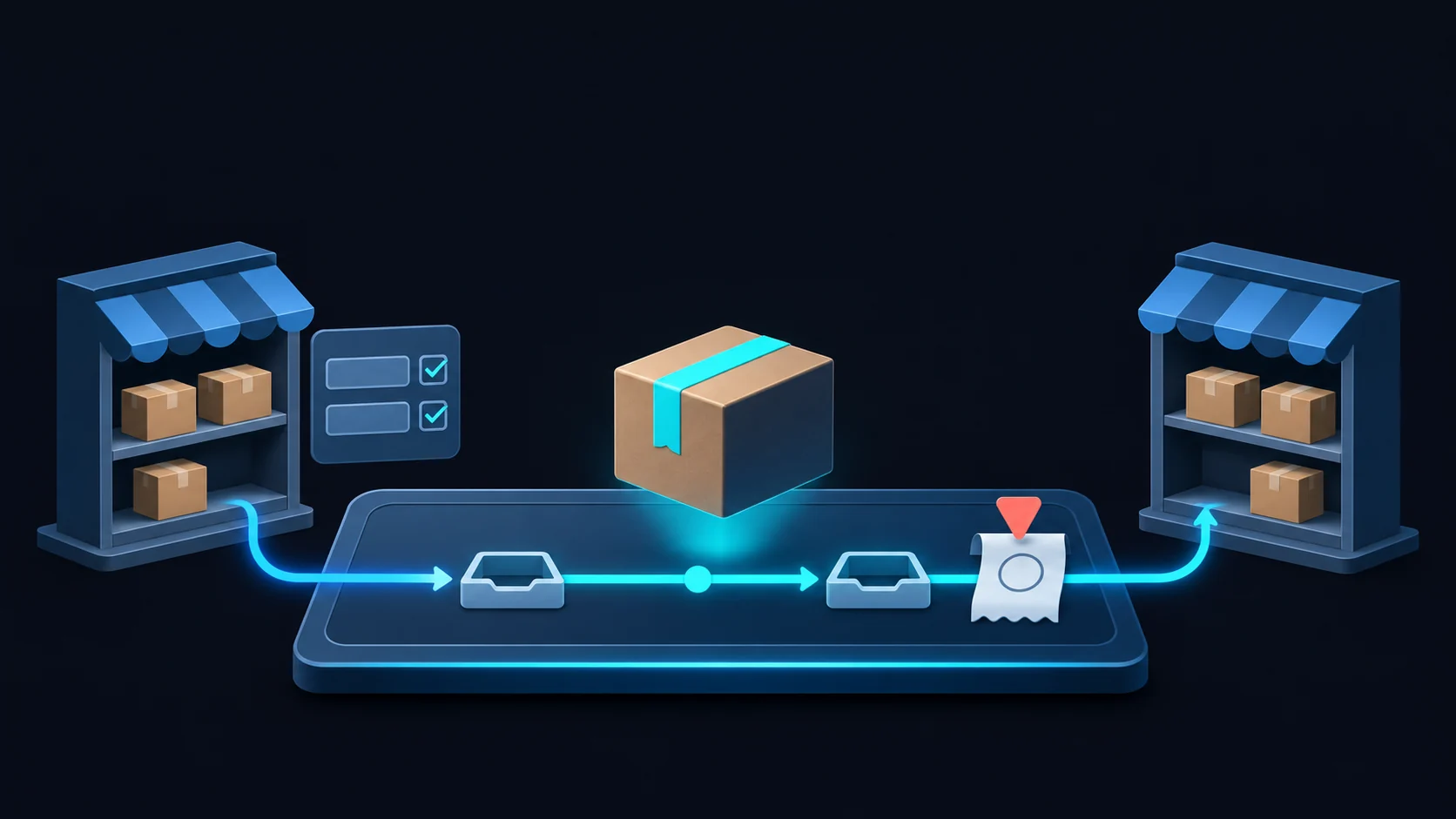
How do both shops confirm the same transfer?
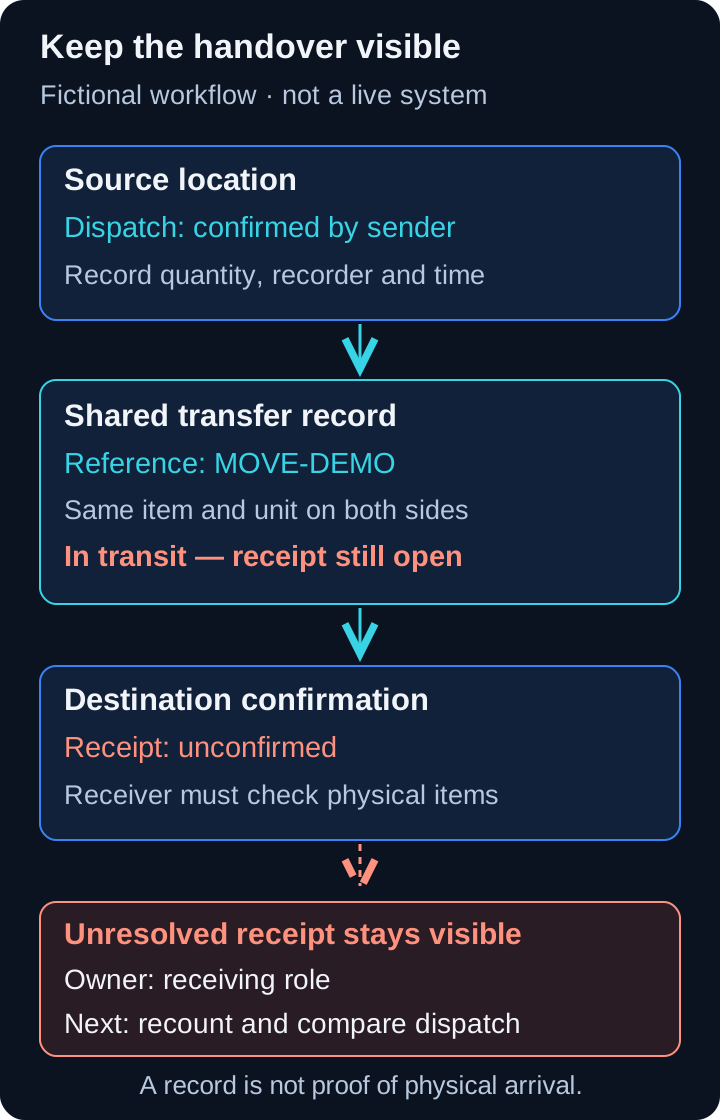 View full-size diagram
A carton leaves one shop for another, the sender marks it out, and the receiving shop still has no matching receipt. A multi-location inventory spreadsheet should link both sides with one shared transfer reference, keep dispatch and receipt confirmations separate, and leave the movement open until someone checks the handover.
Start there rather than adding another location-total tab. A lower balance at the sending shop is not evidence of a higher balance at the destination. This article concerns that gap between shops, not the capacity limits of a one-store inventory sheet.
Fictional example: “Source location,” “Destination location,” “Sample item,” and the reference “MOVE-DEMO” below are invented labels, not a real store, person, product or customer result. Every entry, status and diagram is illustrative; none shows a working stock system.
What connects the sending and receiving shops?
Choose one shared transfer record as the source of truth. Both shops should refer to the same stable reference, not separately invent identifiers that someone must match later. Keep the reference unchanged when the quantity or destination needs correcting. For a movement containing different items, keep distinguishable item lines under that reference and match each receipt to its dispatch line.
Record the source location, destination, item identifier and unit before the handover. Keep the planned quantity distinct from what the sender confirms it actually dispatched. Dispatch confirmation needs its own recorder and time; receipt needs a different confirmation of what arrived, who checked it and when. A planned quantity is neither confirmation.
The fictional record below is a field checklist, not a ready-to-use template or a tested screen.
| Transfer field | What to record | Who confirms or follows up |
|---|---|---|
| Shared reference | MOVE-DEMO, used by both locations and retained through corrections | Transfer coordinator checks that it is not reused for another movement |
| Route and item | Source location → Destination location; Sample item; agreed unit | Sender and receiver check the same item and unit |
| Dispatch confirmation | Actual dispatched quantity, recorder and dispatch time | Sending location checks what left |
| Receipt confirmation | Actual received quantity, recorder and receipt time; blank while unconfirmed | Receiving location checks what physically arrived |
| Open movement | In transit, partial receipt, or exception; unresolved quantity where known | Assigned exception owner records the next check and review time |
| Correction history | Previous value, corrected value, reason, recorder and correction time | Authorized reviewer checks changes without removing the original account |
What should stay visible while stock is in transit?
Treat “in transit” as a meaningful state: dispatch has been confirmed, but receipt is not yet fully confirmed. It describes a record awaiting a handover check, not a tracking signal from a vehicle. Do not count unconfirmed stock as available to sell at the destination. Keep it distinguishable from stock on either shop’s shelf, and agree when confirmed movements affect each location’s stock balance so a later confirmation does not post the same movement again.
In the fictional MOVE-DEMO example, the source has confirmed dispatch and the receipt field remains blank. The movement stays in the open list even if the shops’ combined stock total looks plausible. A blank receipt means “not confirmed,” not “nothing arrived.” A partial receipt records the quantity actually checked and leaves the remainder unresolved; an unexpected delivery without a reference goes to review rather than being guessed onto an unrelated transfer.
Google’s dropdown help describes rules for choosing cell values. Use those choices to standardize status labels such as “In transit” and “Receipt exception.” Google’s filter-view help describes saving views and letting people use different views independently. With the appropriate edit access, an open-transfer view can be saved without changing another person’s view. Both sources checked 2026-11-08. These features organize records; neither proves physical receipt, makes updates atomic, nor creates an audit trail.
How should mismatches and corrections be handled?
Give each unresolved movement an owner, a next action and a next review time. “Check stock” is too vague: the action might be for the receiver to recount the delivered Sample item and compare it with the sender’s dispatch record. The owner coordinates that check; they should not confirm receipt on the receiver’s behalf just to clear the list. Close the exception only when the agreed explanation and required confirmations are recorded.
If a receipt differs from dispatch, retain both reported quantities. Record damage, a partial delivery or an item/unit mismatch as a reason to investigate, not as permission to change the sender’s entry until totals agree. A return needs its own linked movement and confirmations; it should not erase the outward journey. A cancelled plan and a dispatched movement also need different treatment: marking dispatched stock “cancelled” does not put it back on a shelf.
For corrections, preserve what changed, the old and new values, why, who recorded it and when. Agree who can request and approve a change and who can edit the history. A manually editable correction log can support review, but it is not tamper-proof. If the required history must resist editing or reliably establish identity, that needs a different, explicitly implemented control—not a promise attached to an ordinary cell.
When is a spreadsheet not enough for the handover?
A sheet is a candidate when everyone can use the same controlled record and named people can confirm dispatch, receipt and exceptions. It stops being a dependable handover when shops maintain competing copies, nobody owns open receipts, or required checks can be silently bypassed. If stock balances must update together across systems, assess a transactional data store and tested integration rules. A dropdown cannot make those separate writes succeed or fail as one operation.
For scope, workflow automation concerns how records and follow-up steps connect; mobile work apps concern how a sender or receiver enters a confirmation beside the stock. Neither a new screen nor a script removes the need for a shared source of truth and honest human confirmation. The process is only as dependable as those two things.
For the separate tool-fit question, read where one-store spreadsheet inventory reaches its limits. For a related record-matching problem, marketplace settlement reconciliation also distinguishes agreeing records from proof that the real-world event happened.
Local versus live: the deliverables here are article content and illustrative images, not an executable inventory tool. No live Google Sheet, client workflow, physical stock movement or buyer behavior was tested. Any entry or status shown is a design example, not evidence of a live customer’s process or a measured improvement.
Send a sanitized stock-movement sample or describe the dispatch-to-receipt workflow. Remove store and staff names, customer details, account identifiers and private links; retain only the fields, roles and unresolved-handover question needed to discuss the process.
Frequently asked questions
- Does a dispatched status prove the receiving shop has the stock?
- No. Dispatch records the sender's confirmation. The receiving shop must check the physical items and enter its own receipt confirmation against the same transfer reference. A spreadsheet cannot prove physical arrival.
- Can a dropdown or filter view make transfers reliable?
- Dropdown rules can standardize choices, and saved filter views let people inspect different subsets independently. Neither confirms delivery, makes paired writes atomic, nor provides an audit trail by itself. Reliability still depends on the shared record and human checks.
- How should a partial receipt or correction be recorded?
- Keep the original dispatch and record what was actually received, using the same item and unit. Leave the unresolved balance visible with an owner and next action. Preserve the previous value, correction, reason, recorder and time rather than silently overwriting the record.
- 2026.11.08 Job site daily report app: capture work before the drive home
- 2026.11.08 Multi-location inventory spreadsheet: stop missing transfers You are here
- 2026.11.06 Reconcile marketplace payouts with your orders in Google Sheets
- 2026.11.01 What to automate first in a small business office: pick one task
- 2026.10.31 Hiring someone to automate a spreadsheet: 5 questions before you sign
- 2026.10.29 Same order submitted twice at once? Stop duplicate rows in Sheets
- 2026.10.24 Slow Google Sheets script on order intake? Read once, write once
- 2026.10.20 Google Sheets CSV export drops leading zeros: keep IDs intact
- 2026.10.20 Importing orders into Google Sheets without duplicate rows
- 2026.10.16 Google Sheets automation sent the email twice? 6 trigger traps
- 2026.10.16 Stop dragging formulas down in Google Sheets (ARRAYFORMULA)
- 2026.10.15 Filter, total and sort a Google Sheet with one formula (QUERY)
- 2026.10.15 Shift swaps from a phone: one approval, and the roster updates
- 2026.10.14 Google Sheets lookup shows the wrong value: VLOOKUP vs XLOOKUP
- 2026.10.14 Expense app that logs a coffee in two taps and totals in Sheets
- 2026.10.14 Daily check-in app with CSV export you can total in Google Sheets
- 2026.10.13 Stale data on your dashboard: when 'updated' doesn't mean fresh
- 2026.07.28 Tracking staff attendance in Google Calendar: where records break
- 2026.07.26 Google Sheet shared by link: how company data quietly leaks
- 2026.07.23 Form auto-reply emails that annoy customers, and how to fix them
- 2026.07.13 ChatGPT API bill higher than expected? Where the cost leaks
- 2026.06.20 Monthly SaaS bill for a simple workflow: rent it or own a tool?
- 2026.06.19 Adding AI to a work app: what it costs each month, and who pays
- 2026.06.19 Automate repetitive office work in Google Sheets with Apps Script
- 2026.06.16 Field inspection app for a small team: paper checklist to phone
- 2026.06.10 Inventory tracking in Google Sheets for one store: where it stops
- 2026.06.08 Is Google Sheets automation free? No server bill, but plan upkeep
- 2026.06.06 Outsource, DIY or SaaS for one workflow: which costs less?